Edit Shipping Address: Buyer & Seller Guide

The message usually lands the same way: “WRONG ADDRESS. PLEASE HELP!” The order was placed minutes ago, the customer used an old autofill entry, and now your team is racing the fulfillment clock.
For a buyer, it feels like a simple fix. For a Shopify merchant, it rarely is. Someone has to check order status, see whether a label exists, contact the warehouse or 3PL, decide whether the change affects shipping cost, and document what happened so support, ops, and fulfillment don’t work from different versions of the truth.
That’s why edit shipping address requests aren’t really a customer problem. They’re an operational design problem. If the store only gives customers one option, email support and hope someone sees it in time, the business ends up paying for every typo by hand.
The High Cost of a Simple Typo
A customer enters a street correctly but forgets the apartment number. Another uses an old saved address from a previous move. A third sends a panic email after realizing the package is going to a work address they no longer use. Those mistakes look small on the order screen. They create a long chain of manual work once the order starts moving.

For high-volume brands, this isn’t an edge case. The operational gap is large enough that shipping change requests make up 20-30% of post-purchase inquiries, and a 2025 Shopify report said high-volume DTC brands handle over 5,000 monthly tickets for address corrections, while 70% lack self-service tools, forcing manual work that increases handling time by 40% according to USPS Business Mail guidance cited here.
What the support inbox hides
An address change ticket often touches more than support. It can involve:
- Support agents: Verifying what the customer wants changed and whether the order is still editable.
- Ops managers: Deciding if the order should be held, relabeled, or canceled and recreated.
- Warehouse teams or 3PLs: Stopping fulfillment before the wrong label gets applied.
- Finance teams: Handling shipping differences, tax implications, or replacement shipments.
That workload gets worse when the order includes cross-border shipping. In those cases, consignee details and destination accuracy become even more sensitive, which is why understanding terms like essential for importing from China matters for teams handling international parcels.
Practical rule: If your only workflow for address edits is “email us quickly,” you don’t have a workflow. You have a race condition.
The real fix is controlled self-service
The strongest stores don’t treat edit shipping address requests as exceptions. They build a system for them. Customers get a clear way to correct mistakes within a controlled window. Merchants keep the rules, validation, and approval logic.
That changes the experience completely. Instead of support trying to catch an order before it ships, the customer updates it on the order page, the new address gets checked, and the downstream systems stay aligned. The customer feels helped. The merchant avoids preventable manual work.
A Customer's Guide to Editing Your Shipping Address
If you’ve just placed an order and noticed the shipping address is wrong, speed matters. The easiest path is usually the store’s order confirmation email or order status page, not a general contact form.
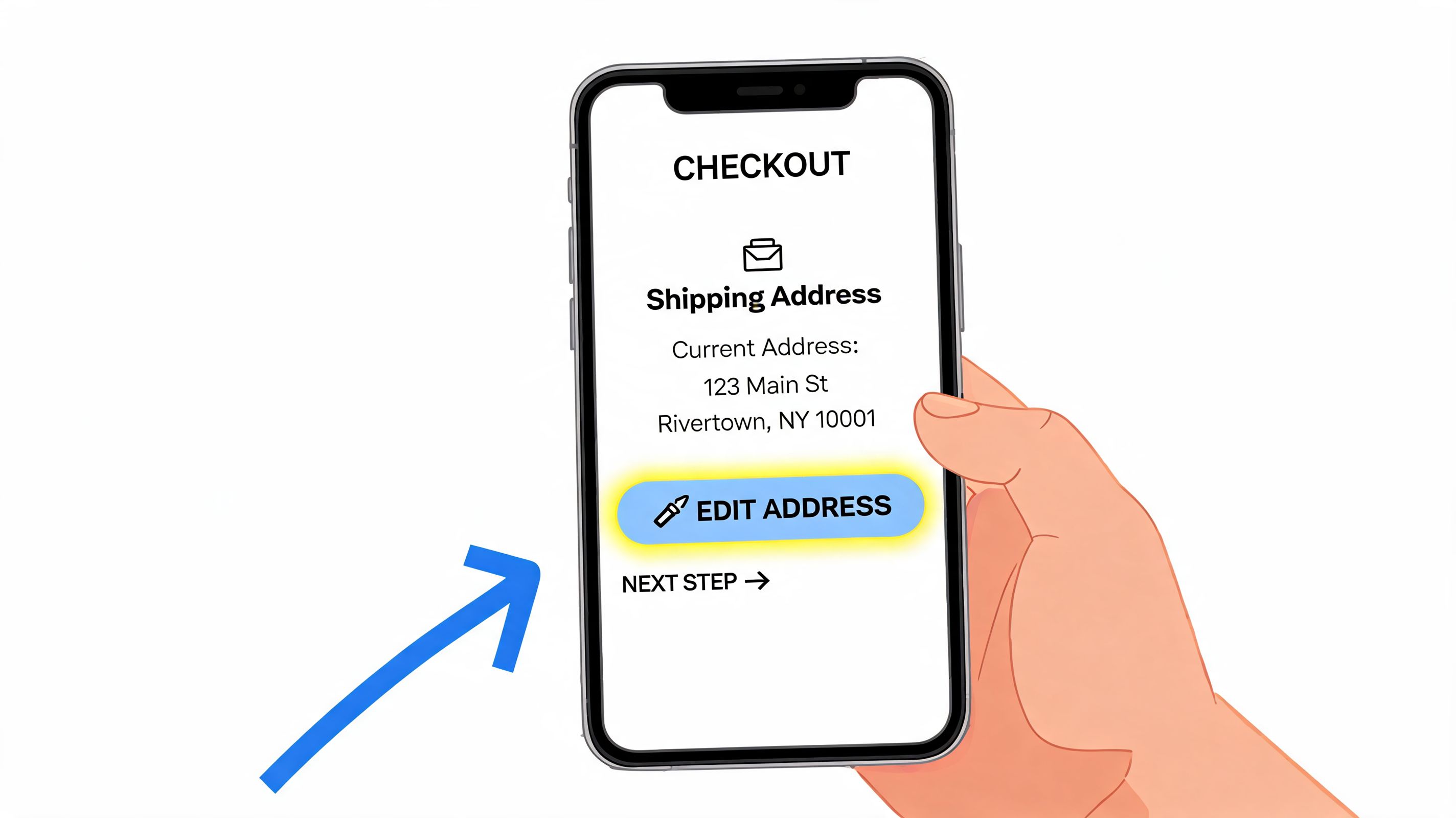
Start with your order confirmation
Look for a button or link labeled something like:
- Edit order
- Manage order
- View order status
- Update shipping details
Modern post-purchase flows usually place the edit option there because it’s tied to your order securely. That’s better than emailing support and waiting for someone to manually verify your request.
If the store supports self-service edits, you’ll typically land on a page that shows your shipping address, order items, and a short message about what can still be changed. Many stores only allow edits before fulfillment begins, so if you see a deadline, act on it immediately.
What you can usually change
Most stores allow a buyer to correct practical address mistakes such as:
- Street spelling errors
- Missing apartment, suite, or unit details
- City, state, or postal code corrections
- Phone number updates tied to delivery
Some stores will also let you change the recipient name or contact details. Fewer will allow country changes or major destination changes, because those can affect shipping cost, duties, fraud screening, or warehouse routing.
If the page says your order can’t be edited anymore, that usually means the merchant has already moved it into fulfillment or released it to the carrier workflow.
How to complete the change cleanly
When the edit form opens, don’t rush through it. Enter the full address exactly as the recipient receives mail there. Include unit numbers, building names, and any delivery-specific detail the carrier needs.
A good edit flow will suggest and standardize addresses while you type. If the store prompts you to choose a validated version, accept it unless you know it’s wrong. That check is there to reduce delivery mistakes.
Later in the process, a visual walk-through helps. This example shows the kind of post-purchase interface many Shopify shoppers now use:
What to expect after you submit
Once you save the updated address, one of two things usually happens:
| Outcome | What it means |
|---|---|
| Instant confirmation | The address passed validation and updated successfully |
| Review required | The store flagged the change for manual review |
Check for a confirmation email after the edit. That message matters because it tells you whether the merchant accepted the new address and gives you a record if anything goes wrong later.
If you don’t have a self-service option, send support one complete message with your order number, the incorrect address, and the corrected version. Multiple fragmented messages usually slow the process down.
For Merchants Enabling Self-Serve Address Edits
High-volume Shopify operations can’t scale address corrections through inbox triage. The moment a store grows, manual edits create bottlenecks between support, ops, and fulfillment. The better approach is to let customers correct routine mistakes themselves, inside rules you control.
The business case is straightforward. For DTC brands, editable shipping addresses yield 75-90% self-service resolution rates and cut support tickets by 40-60%, and a strong implementation uses APIs to fetch and lock the order, validate the new address in real time against services such as Google Places, score deliverability, and tag the order as address_edited for 3PL sync, according to Smarty’s shipping optimization guidance.
Why native admin edits don’t scale
Shopify lets teams edit addresses in the admin for some orders, but that’s not the same as a system. Native edits still depend on a person noticing the request, checking order state, and updating the order before fulfillment moves.
That breaks down fast when:
- Orders route quickly: The warehouse prints labels before support reaches the ticket.
- Teams work across shifts: The customer emails during a handoff or overnight.
- The 3PL needs clean data: Manual changes don’t always propagate clearly unless the workflow is structured.
- Shipping costs change: The team has to decide who absorbs the difference.
What a usable setup looks like
A workable self-serve program has a few essential requirements.
First, the customer needs a secure entry point. That usually means a tokenized order status page or confirmation-email link. The edit action should be tied to that order, not exposed as a general form.
Second, the order needs protection while the edit is happening. A fetch-and-lock pattern prevents an update from colliding with fulfillment events or another support action.
Third, the revised address has to be validated before commitment. That means autocomplete, normalization, and deliverability checks, not just accepting free text and hoping the warehouse catches mistakes later.
Finally, the change has to be visible downstream. The 3PL, support desk, and internal reporting should all know the order was edited and when it happened.
Merchants don’t need more “contact us” buttons. They need fewer moments where a human has to intervene at all.
Where a tool fits
A dedicated order editing layer becomes operational infrastructure rather than a convenience feature. One option is SelfServe’s customer portal, which gives merchants controlled post-purchase editing with configurable permissions, multilingual flows, and validation logic that fits Shopify operations. The point isn’t the widget itself. The point is moving address changes out of the support queue and into a governed workflow.
That same logic applies to preorders, crowdfunding, and other delayed-fulfillment models. Teams dealing with those orders can borrow ideas used to prevent Kickstarter shipping errors, where customer moves and late corrections are common and timing matters.
What works and what doesn’t
Here’s the practical difference between systems that help and systems that create new cleanup work.
| Approach | What happens in practice |
|---|---|
| Email-only correction process | Requests pile up, agents improvise, fulfillment timing wins |
| Unlimited free-text edits | Customers can create new bad data after checkout |
| Controlled self-service with validation | Routine errors resolve fast without new ticket volume |
| Manual-only review for every edit | Safety improves, but the support burden stays high |
A good program doesn’t open the floodgates. It narrows the safe lane for common corrections, then routes edge cases to manual review.
The reward is cleaner operations
When merchants enable customers to edit shipping address details in a controlled way, the visible benefit is fewer tickets. The more important benefit is quieter operations. Support handles exceptions instead of routine cleanup. Fulfillment gets cleaner destination data. Customers get immediate control at the moment they need it most.
That’s how post-purchase editing stops being a support headache and becomes a process advantage.
Setting Rules and Permissions for Safe Address Changes
Merchants usually fail in one of two ways. They either lock everything down and force every customer into support, or they allow edits too loosely and create fraud, relabeling confusion, and bad data. The right setup sits in the middle. It gives customers room to fix honest mistakes while keeping order integrity intact.
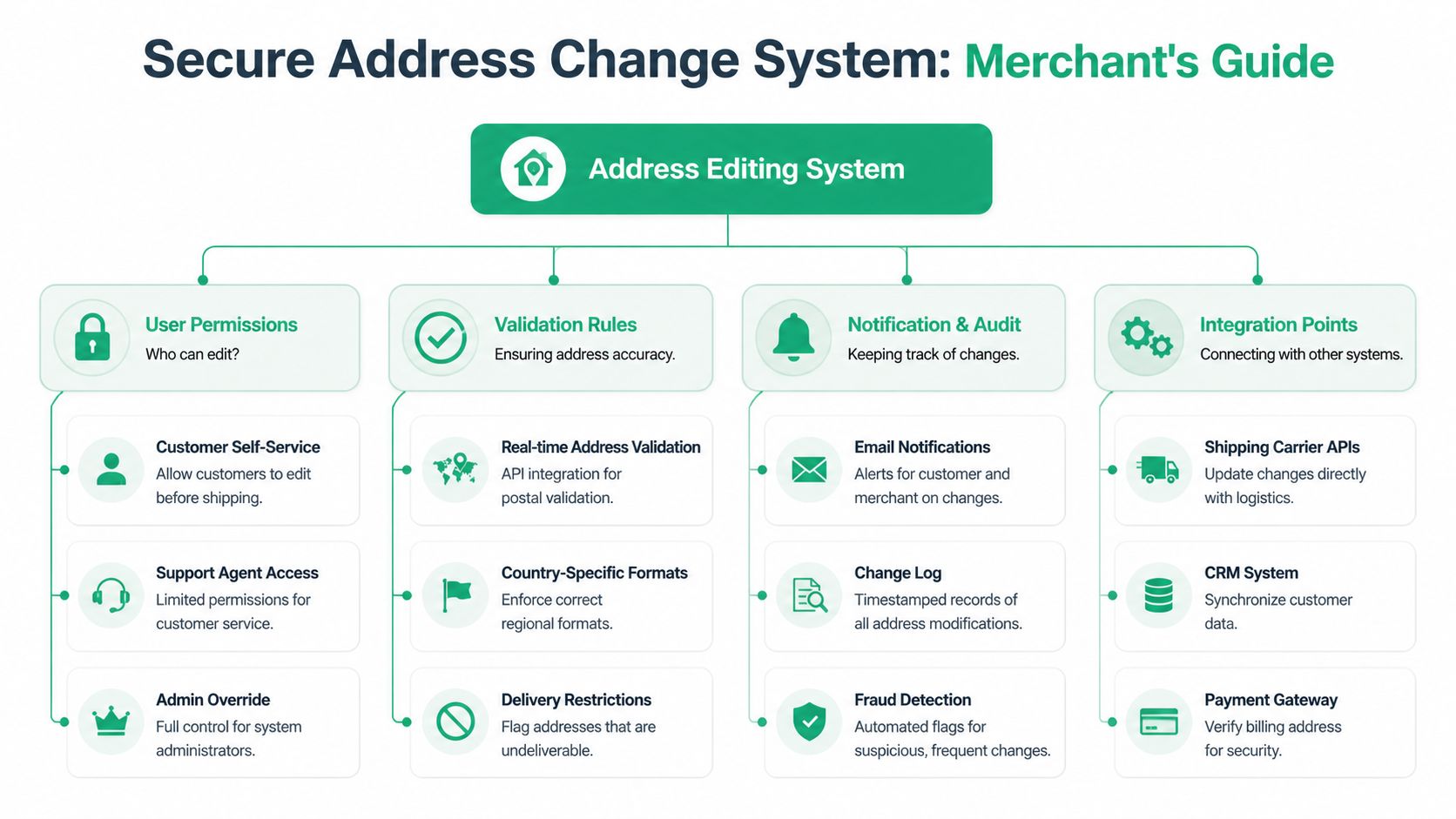
The strongest model is rule-based. A rigorous post-purchase methodology can achieve 97-99% first-attempt delivery success through a permissioned 30-60 minute access window, multilingual autocomplete and geocoding that cut input errors by 70%, a dual correction-validation engine, and an audit log. That process also reduces reshipments by 18-25%, saving $2-5 per order, according to this shipping accuracy methodology.
Time windows matter
Most valid edit requests happen soon after purchase. That’s why a short edit window works so well operationally. It catches the “I used the wrong autofill” moment before the order is too far downstream.
A practical rule set often looks like this:
- Allow fast corrections early: Open the address editor immediately after purchase.
- Close before fulfillment release: Don’t let customers edit once your warehouse or 3PL has begun processing.
- Handle exceptions separately: After the window closes, route requests to support with stricter review.
This is where rule-based order editing for Shopify becomes useful. The key feature isn’t convenience. It’s being able to define exactly when edits are allowed and when they stop.
Validation has to happen before save
If a customer can edit shipping address details after checkout, the form can’t behave like a blank note field. It needs structure.
Use real-time validation to do three jobs at once:
- Autocomplete the address as the customer types
- Normalize formatting to postal standards
- Flag undeliverable or incomplete entries before they’re saved
That reduces a common support failure: replacing one bad address with another slightly different bad address.
Operational note: The safest edit is one that doesn’t require a support agent to interpret what the customer “probably meant.”
Permissions should reflect risk
Not every field carries the same risk. Letting a buyer add a missing apartment number is very different from allowing a country change on a high-value order.
A useful permissions model separates low-risk and high-risk edits.
| Edit type | Typical handling |
|---|---|
| Apartment or unit addition | Usually safe for self-service |
| Street typo correction | Usually safe with validation |
| Recipient phone update | Often safe if fulfillment hasn’t started |
| Country change | Usually manual review |
| Major zone change | Review for shipping cost and fraud |
| Frequent repeated changes | Flag for review |
Support agents should also have narrower permissions than admins. An agent may be able to approve a validated domestic correction. An admin may be the only one allowed to override restrictions or approve high-risk reroutes.
Audit trails and approvals keep the system usable
Every address change should create a timestamped record. You need to know who made the edit, what changed, whether it passed validation, and whether the warehouse or 3PL was notified.
Manual review should trigger when:
- The destination changes materially
- The order value makes rerouting risky
- The customer edits repeatedly
- The address fails validation or conflicts with expected location data
A good approval queue doesn’t slow everything down. It isolates the orders that deserve human judgment.
What not to configure
A few settings look customer-friendly but usually backfire:
- No end time for edits: This invites changes after labels are created.
- Unrestricted international edits: These can affect duties, routing, and deliverability.
- No change confirmation: Customers need proof that the order updated.
- No sync to downstream systems: The store record alone isn’t enough if the 3PL still has the old destination.
If you want edit shipping address capability to reduce work rather than shift it around, the system has to be explicit. Time, validation, permissions, and approvals are the four controls that make that possible.
Proactive Strategies to Reduce Address Errors at the Source
Post-purchase editing matters, but prevention is cheaper than cleanup. The most efficient address correction is the one the customer never has to request.
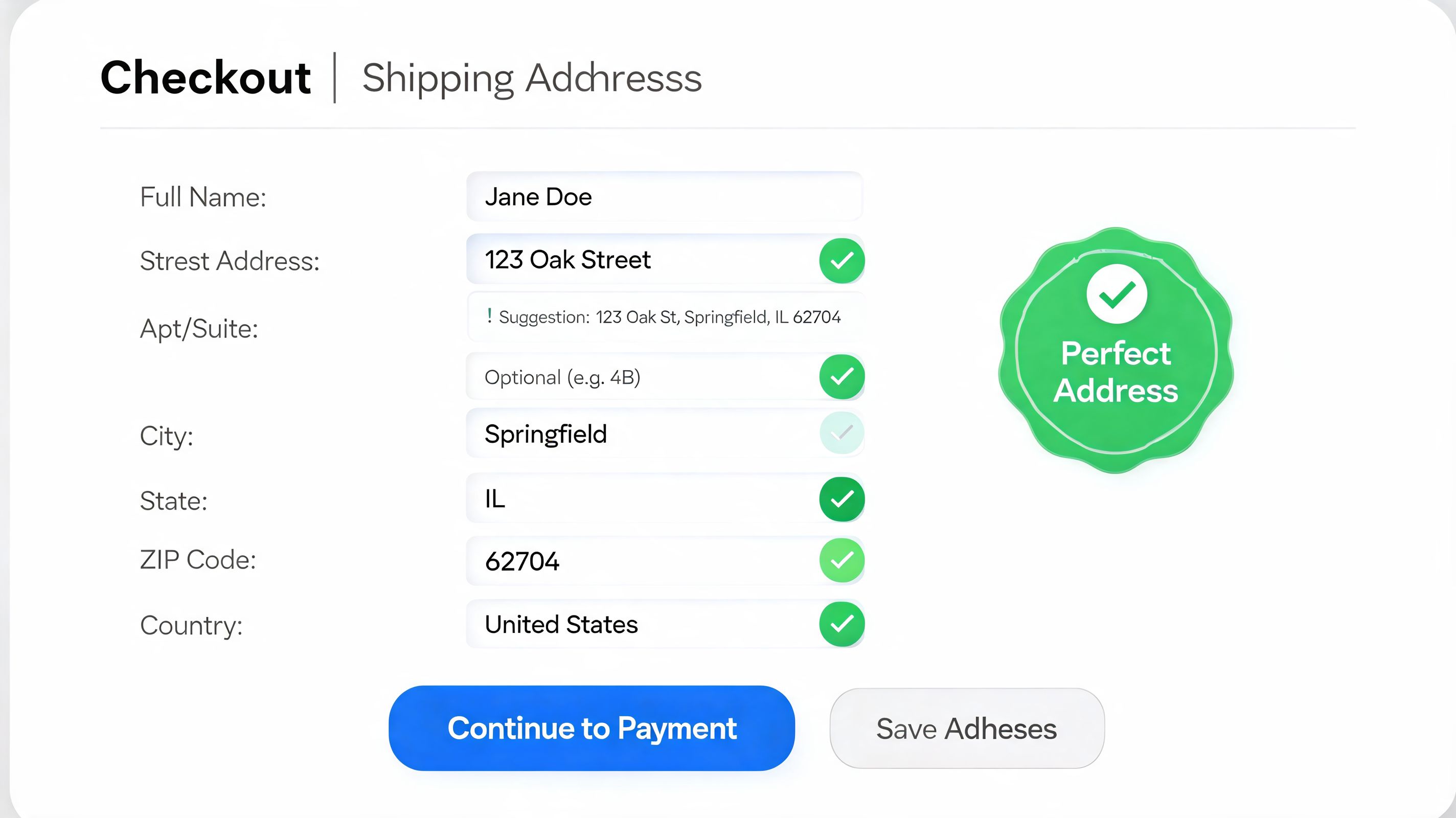
That starts at checkout. Address verification tools can reduce form completion time by up to 80%, letting customers enter a valid address in 7 keystrokes compared with an industry average of 25, using real-time verification and smart type-down engines that reduce manual entry errors and friction, according to Experian’s address validation overview.
Clean checkout design beats longer support macros
A lot of stores still treat the address form like a passive container. It shouldn’t be passive. It should guide the customer to a deliverable destination with as little manual typing as possible.
The practical setup is simple:
- Use autocomplete early: Start suggesting valid addresses from the first keystrokes.
- Standardize formatting automatically: Don’t make the customer guess the expected format.
- Require critical fields: Unit numbers, postal codes, and house numbers shouldn’t be optional where they affect delivery.
- Show the final formatted address clearly: Give the customer one last chance to spot an old autofill or missing detail.
This isn’t just a checkout optimization issue. It’s an order management issue too. Teams thinking through broader fulfillment workflows may find useful insights from Marvyn on ecommerce operations, especially when support, warehouse, and data consistency all intersect.
Use post-purchase communication as a second checkpoint
Even with a strong checkout, some mistakes slip through. That’s why the confirmation email and order status page should act as a backup checkpoint.
A good confirmation flow does three things well:
- Displays the shipping address prominently
- Makes the edit path obvious while the order is still editable
- Explains when the edit window closes
Many brands bury the address below product details or promotional blocks. That’s a missed opportunity. The customer who spots an old address immediately after purchase can often correct it before your team ever sees a ticket.
For Shopify teams refining that layer, Shopify address verification practices are worth reviewing because the goal isn’t just accuracy at input. It’s creating a connected process from checkout through fulfillment handoff.
The best post-purchase support interaction is the one your customer never has to open.
Build one system, not three disconnected fixes
The stores that reduce address errors consistently usually connect three layers:
| Layer | Job |
|---|---|
| Checkout validation | Prevent obvious mistakes before payment |
| Post-purchase edit option | Catch the buyer’s immediate correction window |
| Operational sync | Ensure fulfillment works from the latest valid address |
If one layer is missing, another team pays for it. Weak checkout pushes avoidable errors into support. No edit option pushes urgency into manual operations. Poor downstream sync pushes bad data into fulfillment.
That’s why edit shipping address capability works best as part of a broader prevention system, not as a patch for broken forms.
Troubleshooting Common Address Edit Scenarios
Even a disciplined setup will hit edge cases. The goal isn’t to eliminate every exception. It’s to know which ones can still be saved and which ones need a policy decision.
A useful reminder comes from a real shipment case study: out of 672 bib shipments, 333 addresses were corrected before delivery, which is roughly 50%, and 31 people, or 4.6%, entered a shipping address completely different from their registration address, according to this address correction case study. That’s why edge cases deserve a playbook, not improvisation.
When the edit window has closed
If the customer missed the self-service window, first check whether the order has left your control. There’s a big difference between “window closed” and “already shipped.”
If the order is still sitting with your warehouse or 3PL, support may still be able to intervene manually. If a label has already been created, confirm whether the warehouse can void and replace it before pickup. If the parcel is already in carrier flow, stop promising quick fixes. Set clear expectations and shift to interception, return-to-sender, or reship policies based on your carrier setup.
When the new address changes cost or risk
Some changes are small. Others move the parcel into a new shipping zone or a new country. Those edits need a policy, not a one-off decision by whichever support agent opens the ticket first.
Use a simple rule set:
- Minor domestic correction: Usually approve if validation passes.
- Large destination change: Pause for review.
- High-value order reroute: Verify identity and escalate.
- International correction: Review formatting and deliverability manually if confidence is low.
When fraud is the real issue
Fraud doesn’t always look dramatic. It can show up as repeated destination changes, mismatch between expected customer details and the new destination, or sudden reroutes on expensive orders.
A legitimate customer usually tries to fix one mistake once. A risky request often changes multiple facts around the order.
Teach support and ops to watch for pattern changes, not just field changes. Frequency, timing, and order value matter.
International and military address complications
International addresses, APO, and FPO destinations often fail when merchants force one domestic format onto every buyer. Let validation tools guide format where possible, but keep a manual path for special cases.
The main mistake here is false confidence. If the system isn’t sure the address is deliverable, don’t let a bad edit pass just because the customer typed something that looks complete.
If your team is tired of chasing address correction emails, SelfServe gives Shopify merchants a controlled way to let customers edit shipping details after purchase, with configurable rules, validation, and operational safeguards that reduce manual support work without giving up order control.