How to Improve Customer Satisfaction an Ecommerce Guide
Most ecommerce teams still approach customer satisfaction from the wrong end. They staff inboxes, tighten reply macros, add another help widget, and celebrate faster responses. That helps, but it doesn't remove the reason the customer needed help in the first place.
The sharper way to think about how to improve customer satisfaction is operational. If a shopper can fix a shipping typo, update a phone number, track an order clearly, and add to an order without opening a ticket, satisfaction improves before support gets involved. That shift matters because the post-purchase experience is where avoidable friction usually turns into preventable cost.
The Hidden Threat to Customer Satisfaction in 2026
The headline number looks reassuring. 83% of customers report being happy with service, yet 42% are experiencing more negative issues than in previous years, and customer service now sits near the top of buying expectations at 91%, close to product quality at 96% and price at 94% according to these 2026 customer satisfaction figures.
That combination changes the operating standard.
A store can still post decent satisfaction signals even as customer frustration builds through missed delivery details, unclear tracking, checkout friction, and support loops that should never exist. This represents the underlying risk. The issue isn't only whether customers say they're happy overall. It's whether each order creates new friction that lowers the chance of a repeat purchase.
Good support saves bad moments. Good operations prevent them.
In high-volume ecommerce, post-purchase mistakes are where this gap shows up fastest. A customer notices an apartment number is wrong. Another wants to update a phone number for delivery. Someone else realizes they shipped a gift to an old address. If the only path is "contact support and wait," the customer experiences delay, the agent handles repetitive work, and the business absorbs cost on both sides.
That is why a reactive support model is no longer enough. Better macros and lower first-response time won't fix process design. Teams need to remove avoidable requests by giving shoppers controlled autonomy after checkout.
One of the most practical places to start is tightening address quality before and after purchase with a workflow built around address validation for ecommerce orders. It solves a basic problem, but basic problems create outsized dissatisfaction when they hit fulfillment.
First Measure What Actually Matters
If you want to improve satisfaction, start by measuring moments, not sentiment in the abstract. "How do customers feel about our brand?" is too broad to drive operational change. "How satisfied were you with updating your order details?" is specific enough to fix.
Use the right metric for the right touchpoint
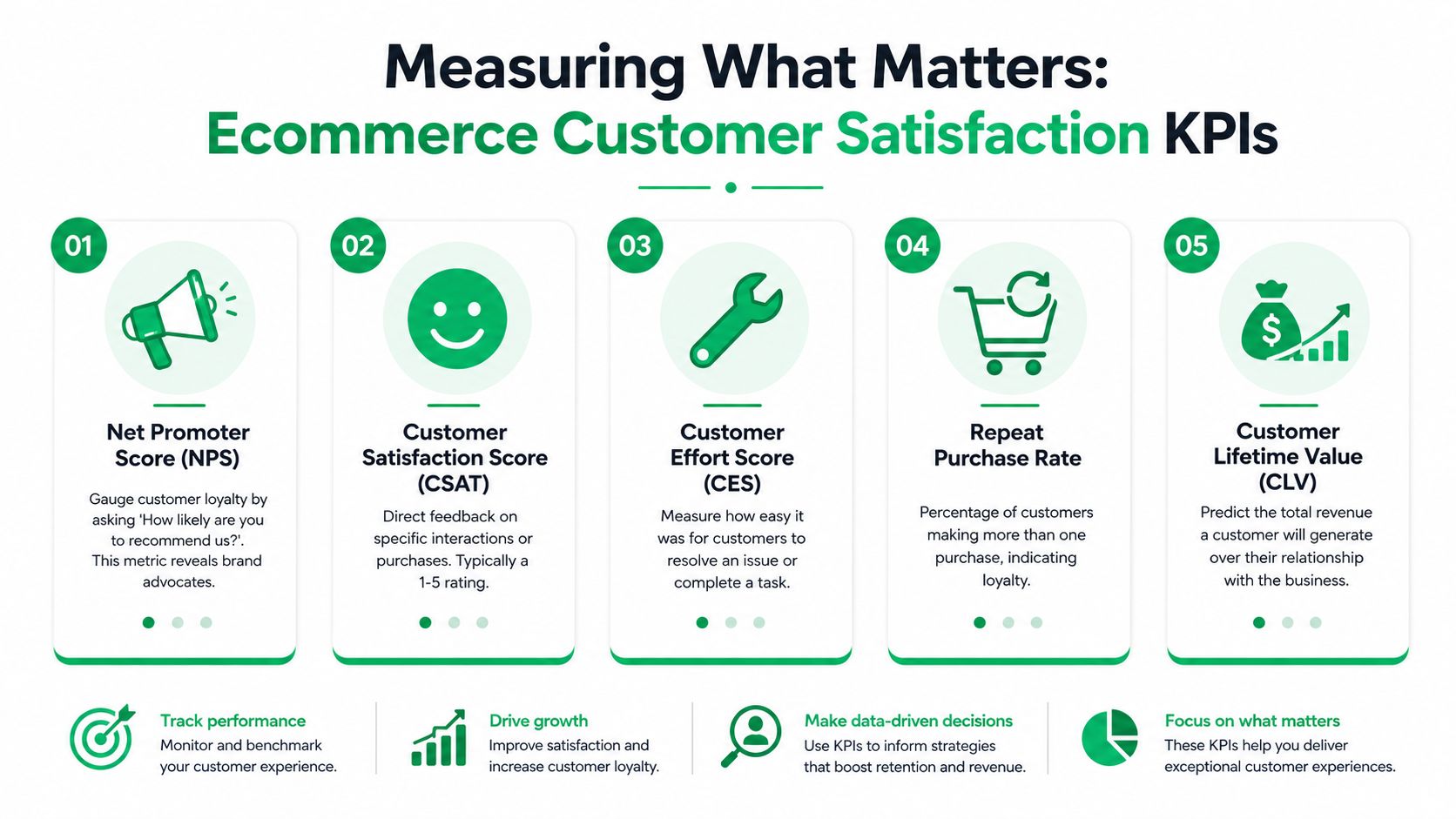
Three survey types matter most in ecommerce.
CSAT works best after a defined interaction. Use it after purchase, after a support exchange, and after a return completes. It tells you whether a specific experience met expectations.
NPS is broader. It helps you understand whether customers would recommend your brand, but it won't tell you why order edit requests spike or why delivery confusion keeps surfacing.
CES is the most underused metric in operations. It measures how easy it was to complete a task or resolve a problem. In practice, this is often the clearest signal of whether your process design is creating friction.
A simple operating model looks like this:
| Touchpoint | Best metric | What it helps diagnose |
|---|---|---|
| Right after checkout | CSAT | Purchase clarity, confirmation quality |
| After a support resolution | CSAT + CES | Quality of help and ease of resolution |
| After a return or exchange | CES | Process friction and policy usability |
| Periodic relationship check | NPS | Loyalty and overall advocacy |
Ask questions your team can act on
Weak surveys produce vague praise and vague complaints. Strong surveys map directly to a workflow owner.
Use questions like:
- Post-purchase CSAT: How satisfied were you with the information and options provided after checkout?
- Support CES: How easy was it to solve your issue?
- Return CES: How easy was it to complete your return or exchange?
- NPS follow-up: What was the main reason for your score?
Each of those questions can lead to a concrete fix. If customers say the effort is high after contacting support, inspect wait states, handoffs, and approval requirements. If post-purchase CSAT drops, inspect confirmation messaging, order status visibility, and editability.
Practical rule: Never send a satisfaction survey unless one team owns the next action.
Trigger surveys at the point of truth
The timing matters as much as the wording. Send surveys after the customer has enough information to judge the experience. For ecommerce, that usually means after purchase, after support, and after returns. Those are the moments when customers can accurately assess whether the business made things easy or hard.
This is also where software matters. Teams are spending heavily because the payoff isn't theoretical. The global customer service software market is projected to grow from $14.9 billion to $68.19 billion by 2031, at a 20.94% CAGR, according to customer service software market projections and satisfaction metrics research. That tells you something important. Serious operators are no longer treating satisfaction tracking as a nice-to-have reporting layer. They treat it as infrastructure.
Tie feedback to operational fixes
The common mistake is collecting scores in one system and handling operations in another with no bridge between them. Don't just read dashboards. Route feedback into action.
For example:
- Flag low-effort scores for manual review.
- Tag the journey stage tied to the complaint.
- Group comments by operational root cause such as address edits, shipping visibility, or return confusion.
- Assign fixes to the owning team, not only support.
- Re-measure after the process change to see whether the score improves.
That last step is where many operations break down. They measure dissatisfaction, patch individual tickets, and move on. But customer satisfaction improves when the process gets easier for the next customer, not only when the last complaint gets answered.
Diagnose Friction Points in Your Customer Journey
Most customer dissatisfaction doesn't start in the help desk. It starts earlier, when the store creates uncertainty, delay, or extra work. By the time a ticket appears, the customer has already experienced the failure.
Audit the journey like an operator
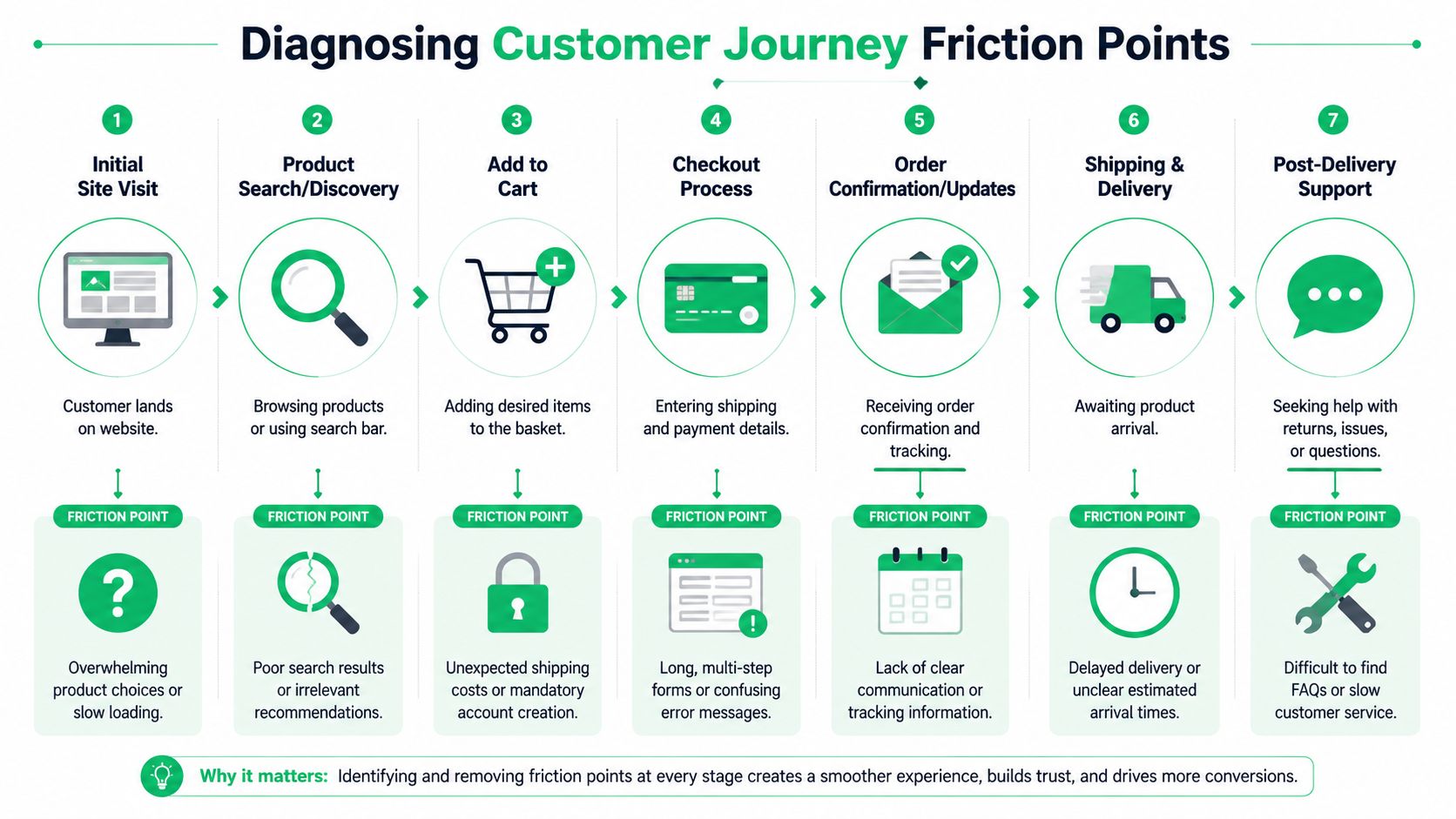
Run through the experience in sequence, not department by department. A customer doesn't care where merchandising ends and support begins. They experience one continuous path.
A practical audit should cover:
- Landing and browsing: Are key pages loading fast and rendering cleanly on real phones?
- Product discovery: Can shoppers find the right variant, shipping info, and policy details without guessing?
- Cart and checkout: Are forms clear, error states understandable, and fields forgiving?
- Confirmation and order status: Does the customer know what happens next and where to make changes?
- Delivery and post-delivery: Can they solve common issues without contacting support?
At this juncture, technical performance stops being "owned by engineering" and starts becoming a satisfaction issue.
Treat speed and stability as customer service
Technical benchmark data shows that sub-1.5s LCP and CLS under 0.1 directly correlate with a 28% increase in CSAT. The same benchmark notes that relying on emulators can miss 31% of real-device rendering issues, and those problems can drop mobile CSAT by 15 points, according to technical benchmarks for ecommerce customer satisfaction.
Those numbers should change how teams prioritize backlog work. Compressing hero images, serving them in WebP, using a CDN well, and reducing layout shift aren't cosmetic wins. They affect whether the customer trusts the storefront enough to complete the next step without hesitation.
If your mobile site behaves well in a browser emulator but breaks on mid-range phones, customers don't care that QA passed. They only remember the friction.
A lot of stores still underestimate this because they separate "site performance" from "customer experience." Customers don't.
Look for effort, not just errors
Not every friction point creates a visible bug. Many create hidden effort.
Here are common examples that erode satisfaction:
| Journey area | What customers encounter | What teams should inspect |
|---|---|---|
| Checkout | Confusing form validation | Field labels, inline errors, autofill behavior |
| Order confirmation | Too little clarity after purchase | Delivery expectations, edit instructions, support deflection |
| Order status | Static pages with no useful actions | Tracking detail, update options, next-step guidance |
| Mobile browsing | Layout shifts or clipped buttons | Real-device testing, viewport handling, image sizing |
To find these issues, combine quantitative data with direct customer comments. Review low-score feedback, inspect replay sessions if you have them, and ask support to identify repeat contacts that should never require an agent.
A useful framework for that analysis is customer effort. If you need a stronger internal lens for that, this guide to measuring Customer Effort Score in ecommerce helps frame the problem correctly. The question isn't only whether customers succeeded. It's how hard they had to work to succeed.
Pay close attention to the post-purchase gap
This is the zone most brands underbuild. Once payment clears, many stores reduce the experience to passive notifications and a support email address. Customers then hit a wall when they need to make a small, reasonable change.
That gap often creates some of the most preventable tickets in ecommerce. Not complex exceptions. Simple corrections.
When teams map friction, they usually find the same pattern. The biggest satisfaction gains don't come from heroic support. They come from removing tasks that should have been self-serve from the start.
Empower Customers with Post-Purchase Self-Service
The fastest way to reduce ticket volume without lowering service quality is to stop routing simple post-purchase changes through agents.
That sounds obvious, but many stores still make customers contact support for tasks that are structured, low-risk, and easy to control with rules. Shipping detail edits are the clearest example.
Why self-service works better than reactive support
When a customer spots a mistake after checkout, speed matters more than friendliness. They don't want reassurance first. They want resolution.
That is why post-purchase self-service has such a strong operational effect. Implementing it with real-time address validation reduces support ticket volume by 35 to 40% in high-volume stores. The same benchmark shows that a 6 to 12 hour edit window yields a 78% success rate and a 4.6/5 CSAT score, while windows under 2 hours cause 22% of attempts to fail, according to post-purchase self-service benchmarks for high-volume ecommerce.
Those numbers line up with what operations teams see in practice. Customers don't open tickets because they enjoy support. They open them because the process gives them no direct path.
Build the self-service layer around controlled permissions
The best implementations are not open-ended. They are rule-based.
A strong setup usually includes:
- Editable fields with guardrails so customers can change shipping or contact details, but not anything that creates fulfillment or fraud risk.
- A defined edit window that reflects real warehouse cutoffs, not arbitrary internal comfort.
- Real-time validation to catch bad addresses before they become failed deliveries.
- Clear eligibility messaging so customers know what can still be changed and what has already moved too far into fulfillment.
This is the operational trade-off. If you make the edit window too tight, customers lose the chance to fix obvious mistakes. If you make it too loose without controls, fulfillment risk rises. The benchmark above gives a practical center of gravity. A moderate window works better than a rushed one.
The wrong edit window creates a double loss. The customer can't solve the problem, and your team still gets the ticket.
Keep the workflow simple for the customer
The customer experience should feel obvious.
A good post-purchase flow looks like this:
- Customer opens the order status page and sees available actions.
- They edit shipping or contact details within the allowed window.
- The system validates the address in real time and prevents low-quality entries.
- The order is tagged or routed internally if the change needs review.
- The customer sees confirmation immediately instead of waiting for an email chain.
That flow removes uncertainty from both sides. Customers know the change was submitted. Support doesn't have to retype basic corrections. Operations keeps control through permissions and approval logic.
Pair self-service with automation, not inbox triage
Self-service handles the straightforward changes. Automation handles what happens around them. That's the durable model.
For stores that still get a high volume of repetitive conversations, it also helps to study approaches to optimizing customer support with AI chatbots. The useful role for chatbots here isn't replacing every agent interaction. It's catching repetitive questions, routing exceptions, and reinforcing the self-service path before a ticket becomes manual work.
A deeper operational blueprint for this model is a post-purchase self-service customer portal. The core idea is simple. Put common order actions where customers already look for status updates, and make those actions safe by design.
Don't bury the feature where customers won't find it
One implementation mistake shows up constantly. Teams add post-purchase controls but hide them behind account login, a separate support center, or buried FAQ content.
Put the action where intent already exists:
- Order status pages
- Thank you pages
- Order confirmation emails
- Tracking updates when relevant
If a customer has to search for the fix, you've preserved most of the original friction.
A quick demo helps make the operating model concrete:
What doesn't work
A few patterns consistently undermine the gains.
Manual approval for every edit slows a process that should be instant for low-risk changes.
Narrow time limits create failed attempts and frustration.
No address validation shifts the problem downstream into delivery exceptions.
Generic "contact us" fallback messaging sends customers back to the queue you were trying to shrink.
The broader lesson is that self-service only improves satisfaction when it gives the customer a real outcome. Cosmetic self-service, where the interface collects requests but humans still do everything manually, usually disappoints both the customer and the team.
Use Smart Automation to Scale and Personalize
Once customers can solve common post-purchase issues themselves, the next step is making the system behave intelligently in the background. Automation, in this instance, earns its keep. Not by adding novelty, but by removing internal handling from routine events.
Automate the operational aftermath
The key is to automate what staff shouldn't have to inspect one order at a time.
Useful workflows include:
- Order tagging after a self-service change so fulfillment and support can identify updated orders immediately.
- Approval queues for higher-risk actions such as cancellations or requests that fall outside standard permissions.
- Notifications to downstream systems when an order requires warehouse attention.
- Exception routing for edits that need human review because they conflict with fulfillment status or policy.
This is the difference between a tool and an operating model. If customer edits happen but your internal team still has to babysit every event, you haven't really scaled the process.
Personalize without adding manual workload
Global stores face another problem. The experience often breaks once language, region, and support channels vary. A customer who can place an order easily shouldn't hit an English-only workflow the moment they need help after purchase.
That's why multilingual adaptation matters in post-purchase tools. The best experiences detect context and present the interface in the shopper's language automatically. Customers don't think of that as a feature. They experience it as competence.
A post-purchase flow feels personal when customers don't have to translate your process for themselves.
You can extend that same principle into messaging channels. For teams supporting international buyers or mobile-first customers, automated WhatsApp customer support can be a practical complement when used for updates, guided answers, and exception routing. It works best when it supports the self-service model, not when it becomes another disconnected inbox.
Use smart defaults to reduce edge cases
Most support load comes from the same predictable requests recurring at scale. Smart defaults prevent those requests from becoming tickets.
Consider operational defaults like these:
| Automation area | Smart default | Why it helps |
|---|---|---|
| Editable fields | Allow only low-risk fields by default | Prevents avoidable review work |
| Language display | Match shopper language automatically | Lowers confusion for global orders |
| Cancellation handling | Send exceptions to approval queues | Keeps control without slowing simple edits |
| Upsell visibility | Show relevant add-ons after confirmed orders | Extends revenue opportunity without extra outreach |
These choices matter because they shape the ratio of automated success to manual intervention. Good automation increases the number of customers who complete a task cleanly on the first attempt.
Keep human review for real exceptions
Automation should absorb volume, not judgment. Support and operations teams still need visibility into the orders that fall outside the rules.
That means keeping human review for cases like:
- Orders that have already moved into fulfillment
- Changes that conflict with fraud controls
- Requests that touch restricted products
- Manual cancellation scenarios requiring approval
The mature model isn't "automate everything." It's "automate the repeatable, surface the exceptions, and make both paths obvious."
When teams do this well, support becomes more skilled and less clerical. Agents spend time handling edge cases, not copying address changes from emails into order records. Customers feel the difference because the system respects their time.
Turn Excellent Service into Increased Revenue
Many teams still frame support improvement as cost control. That's too narrow.
The better view is that satisfaction improves revenue when the post-purchase experience stays active, useful, and easy. A customer who just completed a purchase is paying attention. If the next experience is frictionless, that's the right moment to reinforce trust and present relevant add-ons.

The revenue opportunity most brands ignore
Most customer satisfaction content still overweights reactive support and underweights post-purchase autonomy. That misses one of the clearest operating opportunities in ecommerce.
According to research on post-purchase self-service gaps in customer satisfaction strategies, 68% of customers will abandon a support ticket if they can't instantly edit shipping details. The same research notes that allowing them to do so can reduce support workload by 40% while increasing AOV through embedded upsells.
That combination matters because it changes the economics of service. The same workflow that removes repetitive support labor can also create incremental revenue on pages customers already visit after purchase.
Use post-purchase pages as working assets
Thank you pages and order status pages are often treated as confirmation screens. They should function as operating screens.
A strong setup does three things at once:
- Solves common customer needs such as updating shipping or contact details
- Reinforces confidence with clear order visibility
- Presents relevant upsells while the order still feels active
Customer satisfaction and average order value cease to be separate conversations. If the customer feels in control, they're more receptive to adding something useful to the order. If they feel trapped in a support loop, they won't.
Redefine support as a growth function
The practical takeaway is straightforward. Support should not be judged only by response metrics. It should also be judged by how much avoidable demand it removes and how effectively the post-purchase experience supports retention and expansion.
The stores that do this well don't just answer faster. They design fewer reasons to ask for help, and they turn post-purchase touchpoints into part of the buying journey instead of the administrative aftermath.
If you're serious about how to improve customer satisfaction, start where customers lose the most time. Give them safe control after checkout. Automate the routine aftermath. Then use that cleaner experience to create one more reason to buy again.
SelfServe helps Shopify merchants put that model into practice. It gives customers controlled post-purchase editing for shipping and contact details, supports multilingual experiences, validates addresses in real time, and opens up upsell opportunities on the Thank You and Order Status pages. If you want to reduce repetitive tickets while improving the customer experience and lifting order value, explore SelfServe.