How to Validate an Address: A Guide for E-commerce in 2026

You usually discover your address process is broken after the expensive part starts. An order is packed, the label is printed, the carrier scans it, and then support gets the message: “My tracking hasn't moved” or “That address is correct, why did your checkout reject it?”
That's why learning how to validate an address matters so much in e-commerce. This isn't a back-office data hygiene project. It's a shipping cost problem, a customer trust problem, and a checkout conversion problem.
The mistake I see most often is treating address validation like a single API call. Good teams build a system instead. They clean the data, standardize it, verify deliverability, decide what happens when the validator is unsure, and give the customer a path forward when the machine gets it wrong. That's the difference between a neat demo and an operation that prevents failed deliveries.
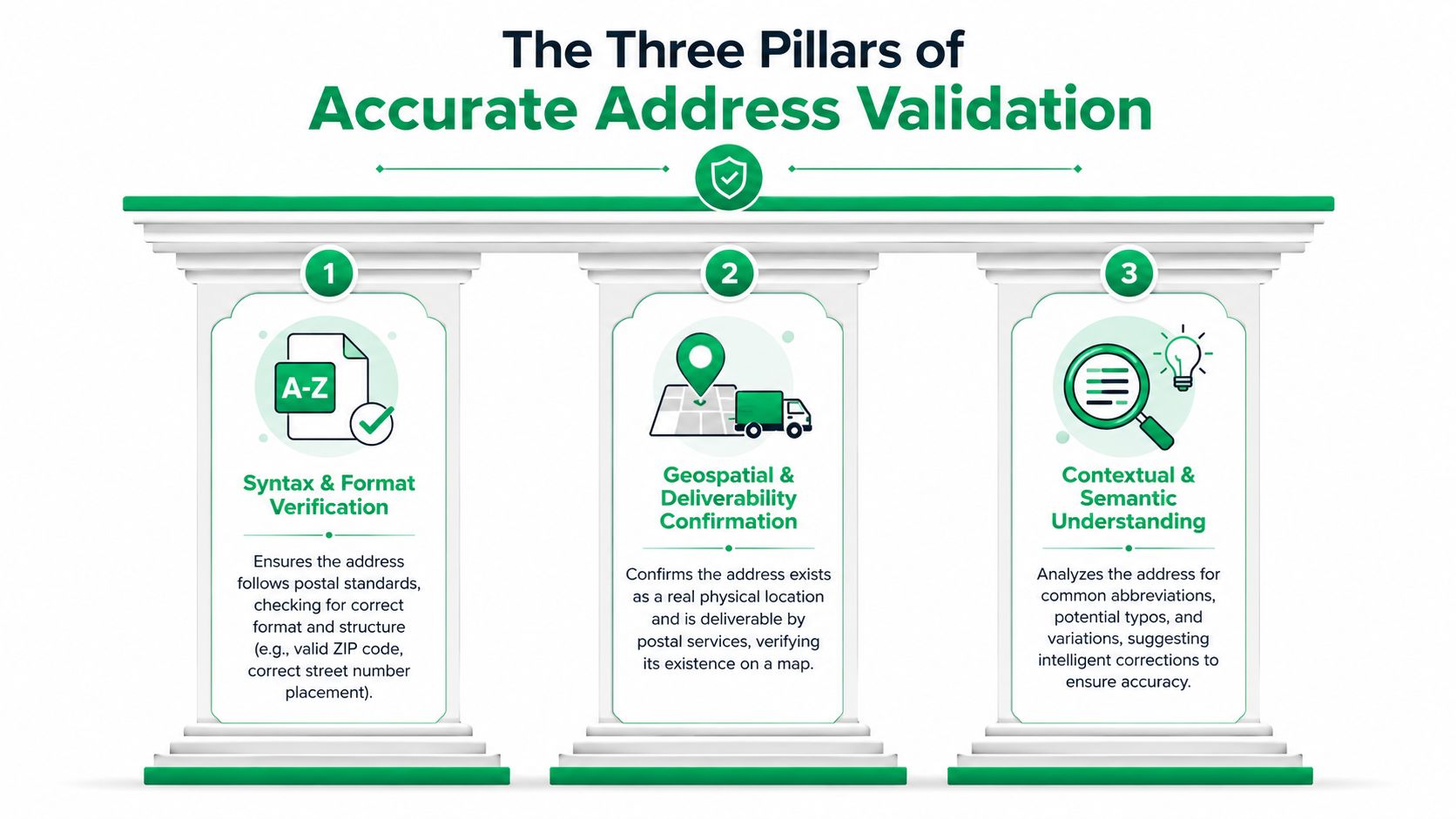
The Three Pillars of Accurate Address Validation
An address isn't “validated” just because it looks formatted. Real validation has three separate jobs, and each one solves a different operational problem.
Cleanse the raw input
Customers don't type addresses the way carriers and postal systems want to read them. They miss ZIP Codes, transpose street numbers, use local shorthand, or paste everything into one field with extra punctuation.
Cleansing is the first pass. It corrects obvious typos, fills in missing components when the system can infer them, and strips out formatting noise. This step matters because bad input at checkout becomes bad data in your order system, your warehouse feed, and your support queue.
Smarty's single-address guidance describes a three-stage method of cleansing, standardization, and deliverability verification, and notes that up to 20% of checkout errors stem from unstandardized or incomplete address data.
A practical example: if a shopper enters a street and city but leaves out the postal code, cleansing may infer the missing piece. If they type “Mian St” instead of “Main St,” cleansing may catch it before the order ever reaches fulfillment.
Standardize to postal rules
Once the input is clean enough to interpret, the next job is standardization. This converts the address into the postal format expected by the destination system.
That sounds cosmetic, but it isn't. Standardization removes ambiguity. It turns inconsistent customer input into a format your carrier, 3PL, and labeling workflow can process reliably.
A standardized address might:
- Normalize abbreviations so “Street” becomes the accepted postal form
- Correct casing and structure so systems can parse it consistently
- Separate components cleanly so line items, locality, region, and postal code map correctly
Practical rule: If your checkout stores addresses exactly as customers type them, you're pushing the cleanup burden downstream to shipping, support, and finance.
Verify deliverability against authoritative data
The last pillar is the one merchants care about most. Can this address receive a shipment?
Deliverability verification checks the address against authoritative postal or delivery datasets. That's what separates “well formatted” from “real and usable.” An address can look perfect and still fail as a delivery point.
For U.S. workflows, systems such as USPS Delivery Point Validation become important. It's also why a format-only check isn't enough. If your process stops at regex, you're validating syntax, not shipments.
Here's the operational version of the framework:
- Cleanse what the customer entered so obvious mistakes don't pollute the order.
- Standardize it so every downstream system reads the same address the same way.
- Verify deliverability so your team knows whether the location exists as a valid destination.
Miss any one of those, and the whole process gets weaker. Clean but unverified data still causes failed deliveries. Verified but unstandardized data still causes friction in fulfillment. Standardized but uncleansed data still lets customer typos sneak in.
Choosing Your Address Validation Method
There's no single “best” method for every store. The right setup depends on order volume, shipping mix, and how much friction your checkout can tolerate. But some approaches are clearly stronger than others.
Why basic format checks fail
A lot of teams start with front-end pattern checks because they're easy. Require a postal code format. Make sure a country is selected. Reject special characters that look suspicious.
That catches obvious mistakes, but it doesn't answer the main question: can the package get there?
Regex and field rules can help with form hygiene, but they break down fast with international formats, apartment logic, rural addresses, and nonstandard local conventions. They also create false confidence. The form looks strict, yet the warehouse still receives unusable addresses.
One form design issue causes extra damage. Google's Address Validation overview notes that over-segmenting the address into separate inputs for house number and street increases user error rates by 30% compared with a single “Address Line 1” field, and that predictive auto-completion can reduce keystrokes by 40%.
Why autocomplete improves capture
Predictive autocomplete is one of the most impactful upgrades you can make because it improves both accuracy and speed. The customer types less, sees valid suggestions, and is less likely to invent formatting.
It also reduces support friction before it begins. If the customer selects a known address rather than typing one from scratch, your validator starts from much better data.
That doesn't mean autocomplete replaces validation. It improves capture. You still need server-side checks to decide whether the final address is complete, deliverable, and suitable for shipping.
For teams weighing Google specifically, this guide on Google Maps address validation is useful for understanding where validation fits in the checkout stack.
Server-side verification is the operational core
The system that protects your shipping budget sits on the server side, where providers such as Google, Melissa, and Smarty check the submitted address against authoritative datasets, return corrected structure, and provide metadata you can act on.
Good server-side validation should do more than return “valid” or “invalid.” It should tell you:
- How confident the match is
- Which components were inferred or corrected
- Whether the location maps to a real-world point
- Whether the shopper should confirm, edit, or proceed
That last part matters. Validation isn't only about data quality. It's about decision-making in checkout and post-purchase flows.
| Method | Accuracy | User Experience | Implementation Cost |
|---|---|---|---|
| Basic regex and format rules | Low for deliverability, useful only for simple input hygiene | Often frustrating when rules are rigid | Low |
| Predictive autocomplete | Strong for clean capture, but not enough on its own | Usually the best checkout experience | Moderate |
| Server-side validation API | Highest practical reliability for shipping workflows | Good when paired with clear prompts and fallback logic | Moderate to high |
If you can only invest in one layer, don't choose the one that merely checks formatting. Choose the one that helps your team avoid bad shipments.
Integrating Validation into Your E-commerce Store
Address validation works best when it's placed at the exact points where customers can still fix the problem themselves. In most stores, that means two moments matter most: checkout and the post-purchase window before fulfillment locks the order.
Put real-time validation inside checkout
Checkout is where bad addresses are cheapest to fix. The customer is present, the context is fresh, and no one has packed anything yet.
Melissa's address verification overview makes the business case clearly: real-time address verification eliminates shipping costs attributed to incorrect addresses, improves delivery predictability, and reduces failed deliveries by catching bad input at the point of entry.
That should shape the way you implement it:
- Validate after entry, not days later so the shopper can correct issues immediately
- Suggest a corrected version instead of only throwing an error
- Keep the form flow smooth so validation helps rather than interrupts
- Store the corrected address so fulfillment, fraud review, and support all work from the same record
The strongest checkout implementations don't force the customer into a dead end. They present “use suggested address” and “keep my entry” as deliberate choices when confidence is mixed, then log that decision for the operations team.
Use the post-purchase window to catch what checkout misses
Some bad addresses still get through. Customers rush. Mobile forms hide apartment fields. New addresses don't appear in datasets yet. That's why the order status page matters more than most merchants realize.
A post-purchase workflow gives customers one more controlled chance to fix shipping details before pick and pack is complete. That reduces “please update my address” tickets and lowers the odds that your support team becomes a manual relay between customer and warehouse.
This is also where broader operational tooling matters. If you're evaluating the bigger logistics picture, Peak Transport's piece on leveraging final mile delivery technology is a useful reminder that clean address data is only one part of reliable delivery execution.
For Shopify teams building that second checkpoint, this overview of an address validation tool for post-purchase edits is relevant because it focuses on catching errors before fulfillment finalizes the shipment.
Where merchants usually get it wrong
The common implementation mistakes aren't technical. They're workflow mistakes.
- They validate too late after labels are printed or orders are routed.
- They block too aggressively when the API isn't fully confident.
- They leave support to clean up exceptions manually with no customer self-service path.
- They split ownership so checkout, support, and ops each see a different version of the address.
The address record should have one lifecycle. Customer enters it, the system checks it, the customer confirms it, and every downstream team uses the same final version.
That's what turns validation from a widget into a process.
Designing a Better UX for Validation Failures
The true test of your validation setup isn't what happens when the API is confident. It's what happens when the customer insists the address is right and your system disagrees.
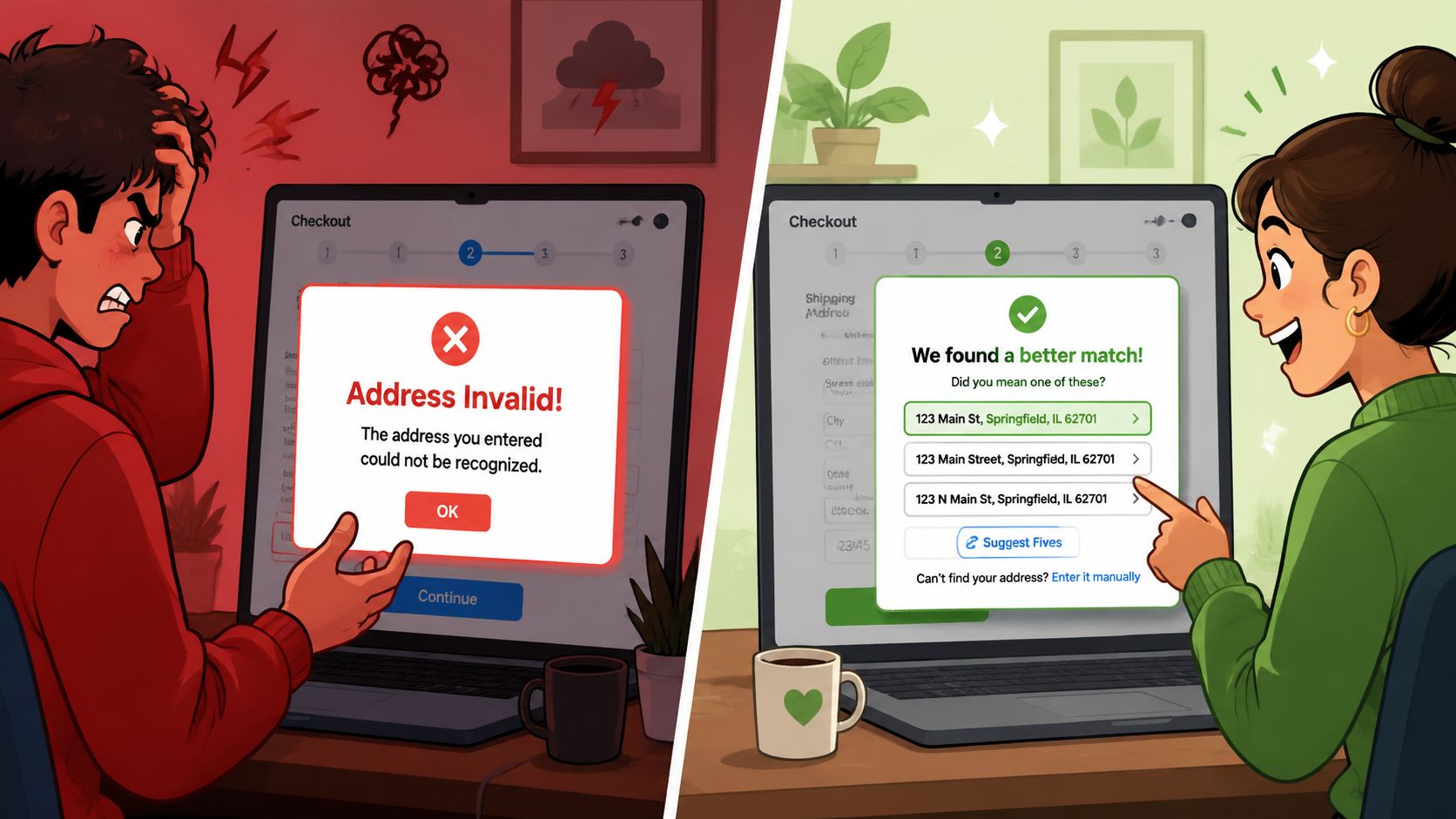
Too many stores treat uncertainty like fraud. They show “Invalid address,” block checkout, and force the shopper to guess what the form wants. That's how you lose legitimate orders.
Baymard Institute data cited here says 47% of major e-commerce sites still lack address validators, and fewer than 15% of those that do provide dynamic fallback options or manual correction workflows for false-negative cases. That gap explains why so many validation experiences still feel brittle.
Replace blocking errors with guided choices
A good failure state should help the customer answer one of three questions:
- Is there a typo I should fix?
- Is your suggested address better than mine?
- If my address is unusual but correct, how do I proceed?
That means your messages need to be specific. “Invalid address” is useless. “We couldn't confirm the apartment number” is actionable. “We found a close match, please confirm” is even better.
Useful fallback patterns include:
- Suggested correction prompts with one-click acceptance
- Warnings for missing unit details when the building appears to need them
- Manual override options for addresses the customer knows are valid
- Escalation rules that flag uncertain orders for review instead of blocking payment
Let customers proceed when the machine is unsure
An address validator is not the final authority on reality. New developments, recent road changes, military destinations, and local delivery conventions often outpace databases.
That's why manual override matters. If the system has low confidence, let the customer continue after acknowledging the risk. Then route the order into a queue for review if needed.
“Your address may still be deliverable, but we couldn't fully confirm it. Please review the suggestion below or continue with your original entry.”
That kind of message protects conversion without pretending the risk doesn't exist.
A short product demo makes this easier to visualize:
Write for stressed customers, not internal teams
Customers don't care whether the validator failed because of parsing, geocoding confidence, or postal normalization. They care whether the order will arrive.
So your UX should translate system uncertainty into plain language:
- Say what's wrong in customer terms
- Offer the next best action
- Avoid technical jargon
- Preserve the original entry so they don't have to retype everything
The best validation UI catches routine errors automatically and treats edge cases with humility. That's what keeps a checkout useful instead of rigid.
Navigating International Address Validation
Domestic logic breaks fast once you sell across borders. Street order changes. Region labels change. Postal codes change. In some countries, the apartment or building detail carries more delivery importance than the street line structure U.S. merchants are used to.
The first rule is simple. International validation only works if the system can match the address against that specific country's official database. Smarty's international validation overview notes that leading tools validate across 240 to 250+ countries, but quality varies widely, and “A+” level accuracy is available only in certain regions.
Country is not optional
Many merchants make country selection feel secondary. It isn't. Validation systems need the destination country to know which rules, datasets, and postal conventions to apply.
If the country is missing or malformed, validation can fail even when the physical address exists. That's especially important in stores with accelerated checkout flows, saved wallets, and international traffic.
Build forms around local conventions
International checkout forms should adapt to the destination instead of forcing every customer into a U.S.-style template.
That usually means:
- Renaming fields locally such as postcode versus ZIP Code
- Allowing different component order across markets
- Supporting accents and local character usage
- Accepting that precision differs by country
For merchants working through broader storefront adaptation, these localization best practices for Shopify are a practical companion to address validation work.
Global coverage is broad. Global certainty isn't. Your workflow should reflect that.
Troubleshooting Validation Blind Spots and Edge Cases
The biggest misconception in this space is that a strong API makes address problems disappear. It doesn't. It automates the common cases and exposes the hard ones.
The hard ones matter because they're often tied to real customers in places your business still needs to serve.
Rural and underserved addresses are a real blind spot
Standard validators are weakest where address infrastructure is least tidy. Rural routes, tribal lands, nontraditional delivery setups, and underserved areas often don't fit neatly into mainstream geocoding or postal datasets.
A 2024 Consumer Finance Bureau analysis found that over 12 million rural and underserved U.S. properties are not auto-resolvable by standard geocoding or address validation tools. That creates a real blind spot for merchants shipping outside conventional urban address patterns.
This is why some customers tell the truth, enter the address they successfully receive packages at, and still hit a validation error.
New construction and database lag
Freshly built homes and newly renamed roads often exist on the ground before they exist in the validator's source data. The carrier may know the stop. The customer may receive local deliveries already. Your checkout may still reject it.
Military-style addressing and special routing formats can create the same kind of mismatch. The issue isn't always that the address is wrong. Sometimes the dataset is late.
Build fallback logic instead of pretending certainty
You need operational rules for addresses that fail automated checks but still might be legitimate.
A resilient workflow usually includes:
- Confidence-based handling where low-confidence results trigger review instead of an immediate block
- Alternative format prompts so customers can try another accepted version of the address
- Manual review queues for orders with high revenue value or unusual destination patterns
- Customer confirmation capture so your team knows whether the shopper accepted a suggested correction or chose to keep the original entry
This is also where geocoded coordinates and confidence metadata become useful operationally. They don't solve every rural edge case, but they help your team distinguish “obviously wrong” from “possibly valid but not fully registered.”
What works in practice
When a validator returns “does not exist,” don't assume the order should die there. Ask a better set of questions:
- Is this a low-confidence mismatch or a clearly malformed entry?
- Did the customer select a suggested address and then edit it manually?
- Is the destination known for rural or nonstandard formatting?
- Can support or ops review it before fulfillment commits inventory and label spend?
A smart validation system doesn't try to eliminate exceptions. It routes exceptions to the right next step with the least customer friction.
If your current setup treats every false negative as a hard stop, you're not just protecting the business. You're also rejecting valid demand.
SelfServe helps Shopify merchants turn address validation into a cleaner post-purchase workflow. Customers can update shipping details themselves within rules you control, and built-in Google Maps validation helps catch bad addresses before they become support tickets or failed deliveries. If you want a practical way to reduce manual edits and protect fulfillment accuracy, take a look at SelfServe.