Webhook Automation for Shopify: Build Reliable
A customer notices a wrong shipping address minutes after placing an order. Another shopper reaches the Thank You page and would happily add a complementary product, but the offer never appears. Meanwhile, your support team is copying order details between Shopify, the warehouse system, and customer records because one update arrived late or not at all.
That's the gap webhook automation is meant to close. A webhook turns an event in Shopify into a dependable signal for the next operational action, but a production system needs more than a URL that accepts JSON. It needs authentication, fast acknowledgment, duplicate protection, durable processing, replay controls, and logs that tell your team what happened.
For Shopify merchants, the highest-value window often starts immediately after checkout. Order edits, address corrections, customer changes, fulfillment routing, and relevant upsells all depend on timely coordination. This guide focuses on the patterns that keep those workflows safe when deliveries fail, repeat, arrive late, or appear out of sequence.
Why Webhook Automation Matters for Shopify Operations
The business problem usually appears before the technical one. A customer sends a support message asking to correct an address, but the warehouse has already received the old information. A shopper wants to add a product after checkout, yet the store has no reliable trigger to coordinate the request with the existing order. An operations manager discovers that a VIP order wasn't routed correctly because a tag update depended on a manual review.
Polling can find some of these changes, but it introduces delay and unnecessary work. A process repeatedly asks whether anything changed, then has to decide whether the same record was already handled. Webhooks invert that relationship. Shopify or another service sends an event when a relevant change occurs, allowing your system to start the next action without repeatedly querying the source.
That makes webhook automation an operational backbone rather than a developer convenience. It can connect post-purchase actions to order management, customer support, fulfillment, fraud review, analytics, and Shopify Flow. A merchant can define a business event, preserve the original payload, and route the work to the system that owns the next decision.
Practical rule: Treat every webhook as an instruction to evaluate state, not as permission to blindly perform a side effect.
The ecosystem has also matured. Svix's 2024 State of Webhooks report found webhook adoption rose from 83% in 2023 to 85% in 2024 across the same sample of 100 companies. The report also recorded a 17% increase in adoption of HMAC-SHA256 webhook authentication best practice. Those figures matter because Shopify merchants increasingly integrate with services that already assume event-driven delivery.
A well-designed workflow reduces the number of places where a support agent must intervene. It can preserve a customer's corrected address, route an edited order to the right operational queue, or present a relevant post-purchase offer while the order context is still fresh. The implementation still needs engineering discipline, but the business outcome is straightforward: fewer missed changes, fewer avoidable tickets, and clearer ownership of each post-purchase action. Merchants evaluating the broader opportunity can also review this guide to ecommerce automation.
How Shopify Webhooks Work Under the Hood
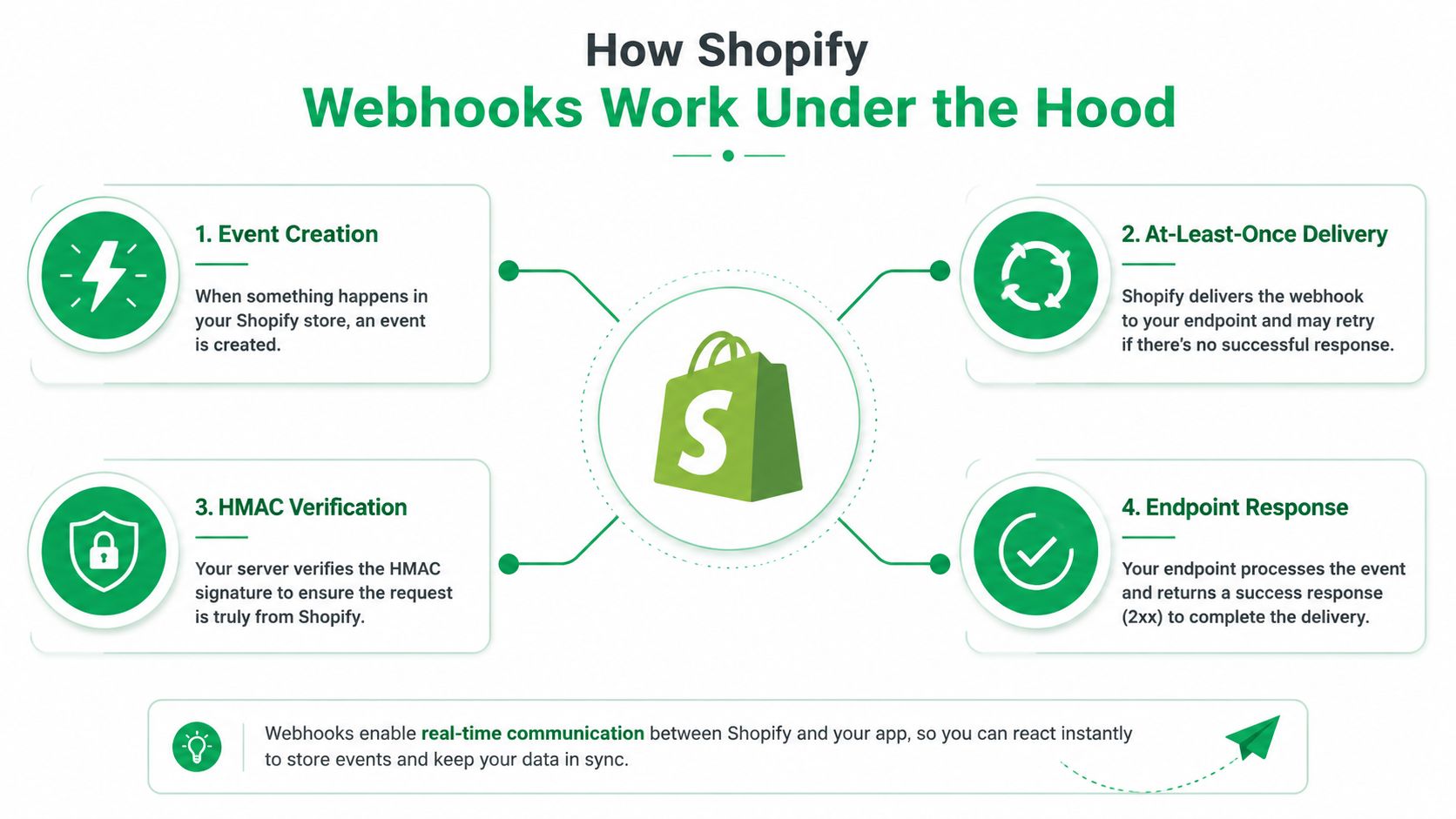
Shopify webhook automation begins with a topic subscription. Your app registers interest in an event, Shopify creates the event when the underlying resource changes, and Shopify sends an HTTP request to the configured endpoint. The payload contains the event data, while request headers provide metadata needed for verification and routing.
A useful event map starts with business decisions rather than available topics. For example, an order creation event may start fraud or routing checks, an order update may trigger synchronization with internal systems, and an order edit may require recalculation or fulfillment review. Keep the event-to-action relationship explicit. If one endpoint receives everything and guesses what to do from loosely defined fields, debugging becomes difficult as the store grows.
Delivery is not the same as successful processing
Shopify's delivery model is at least once. According to Shopify's webhook troubleshooting documentation, failed calls may be retried up to eight times over a four-hour period, and a subscription can be removed if failures continue. That guarantee protects delivery attempts, but it also means your consumer must expect duplicates.
A timeout doesn't prove that your business logic didn't run. Your endpoint may have charged a service, written a database record, or submitted a fulfillment request before the connection failed. Shopify then retries, and a handler without deduplication repeats the side effect.
The endpoint should verify the HMAC-SHA256 signature using the shared secret before trusting the payload. It should also acknowledge valid receipt quickly with a 2xx response. Long-running work belongs behind the request boundary, where a queue or durable job system can process it without forcing Shopify to wait for every downstream dependency.
Build the event map before the handler
For each topic, document the source event, the required fields, the internal record it affects, the side effects it may trigger, and the recovery path if processing stops. This design exercise exposes questions that a basic tutorial usually ignores:
- Ownership: Which system is authoritative for the order, customer, address, or fulfillment state?
- Ordering: Can a later update arrive before an earlier one has finished processing?
- Replay: Can an operator safely run the event again?
- Retention: What payload and metadata must remain available for audit or reconciliation?
Shopify-specific orchestration can also be extended through Shopify Flow examples, especially when tags or order changes need to start downstream workflows.
Designing and Implementing Resilient Webhook Automation
A reliable pipeline separates receipt, verification, persistence, and business processing. Combining all four inside a single synchronous request handler is the common shortcut that fails under load or during an outage.
Start by creating subscriptions only for events tied to a real operational decision. Give each subscription a clear owner and document which internal workflow consumes it. Avoid subscribing to broad topics only because they're available. Excess events increase storage, processing, and debugging noise.
Verify, persist, acknowledge
When a request arrives, capture the raw request body before parsing it. Compute the expected HMAC-SHA256 signature with the app secret, compare it safely with the supplied signature, and reject requests that fail verification. Don't reconstruct the signature from a reformatted JSON object, because changes in whitespace or serialization can invalidate an otherwise legitimate request.
After verification, write a durable intake record containing the event identifier, topic, shop identity, received time, payload, and processing status. Then return a 2xx response as quickly as your persistence guarantee allows. The worker can claim the record and perform slower tasks such as order synchronization, tagging, inventory checks, or notifications.
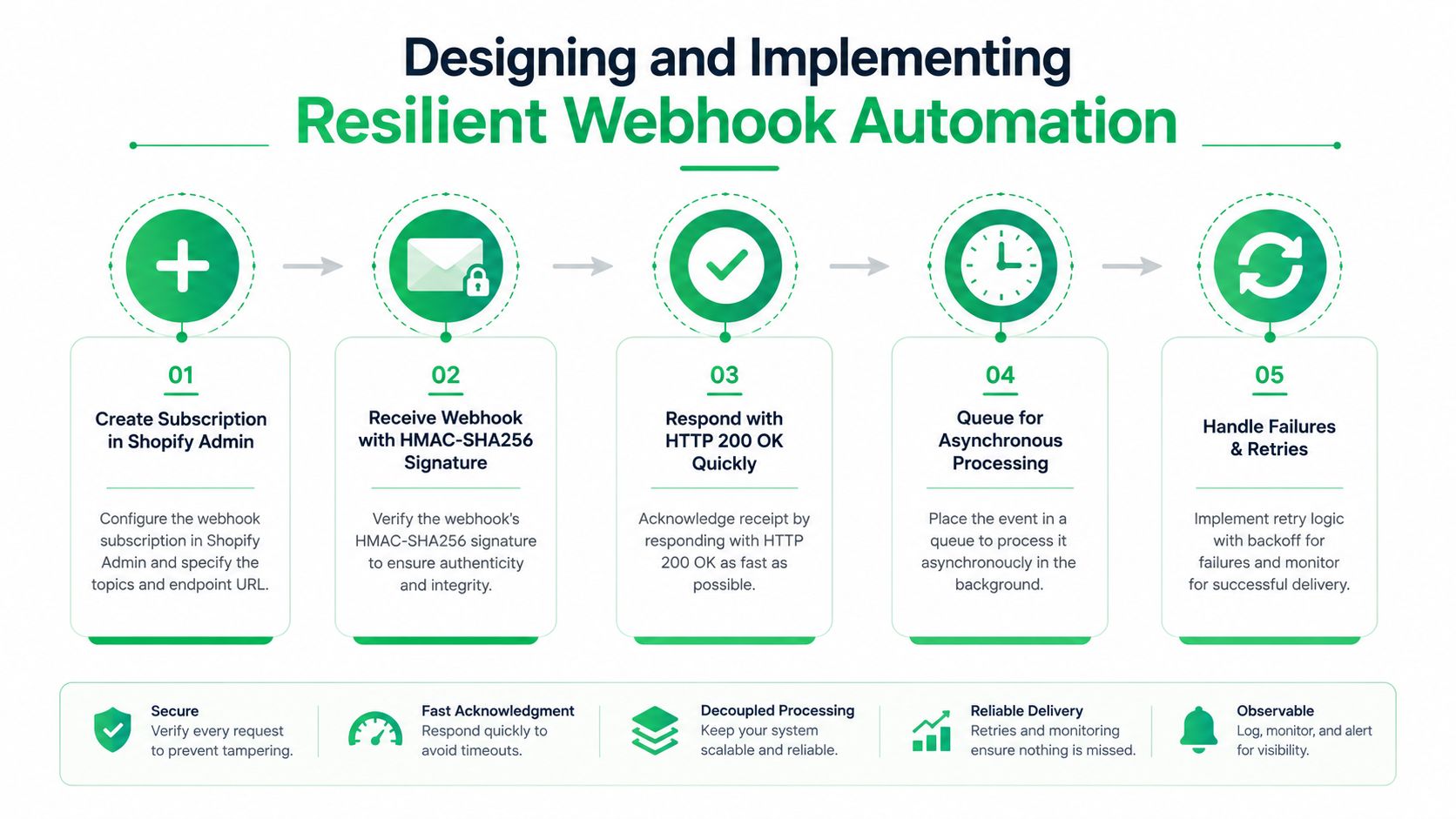
A queue gives you controlled concurrency and a place to apply retry policy. It also stops downstream slowness from turning into repeated sender retries. The queue record should carry enough context to inspect and replay the work without depending on an operator's memory.
Make side effects idempotent
Idempotency means processing the same event more than once produces the same final business result. Store a provider event identifier, or derive a carefully scoped idempotency key when the provider's identifier isn't sufficient. Enforce uniqueness at the database layer, not only in application code, because concurrent workers can pass an in-memory check at the same time.
For order updates, compare the incoming version or meaningful state before applying changes. For tags, use set-like operations rather than blindly appending. For external API calls, pass an idempotency key when the destination supports one, and store the destination's response so a retry can reuse the known result.
A retry is normal delivery behavior. It shouldn't become a second refund, a second notification, or a second fulfillment request.
Retry only failures that might recover. Network timeouts, temporary service errors, and rate limits can go back to the queue. Invalid signatures, malformed payloads, missing shop configuration, and permanent validation errors need a clear failure state instead of endless retries.
Use capped exponential backoff with jitter. Immediate or fixed-interval retries can synchronize many workers and create thundering-herd behavior. Operational guidance from Hook0's webhook retry strategy documentation identifies 2% to 5% first-attempt failure as normal in production and recommends monitoring success rate, retry rate, queue depth, dead-letter queue volume, and p95 or p99 latency.
For broader service design, the backend error handling best practices from Appjet.ai are useful when deciding how to classify failures, preserve context, and expose actionable diagnostics.
Keep exhausted jobs in a dead-letter queue, or DLQ, with the original payload, failure history, and last error. A replay action should create an auditable new attempt rather than silently mutating the original record. Before replaying, confirm the current Shopify order state, because the customer or an operator may have made a newer change.
Real World Shopify Use Cases and Example Payloads
The most useful Shopify webhook automations connect an event to a narrowly defined operational decision. They don't treat every order update as a reason to run every workflow. The following examples use trimmed payloads to show the shape of the decision, not a complete Shopify schema.
Address and contact corrections
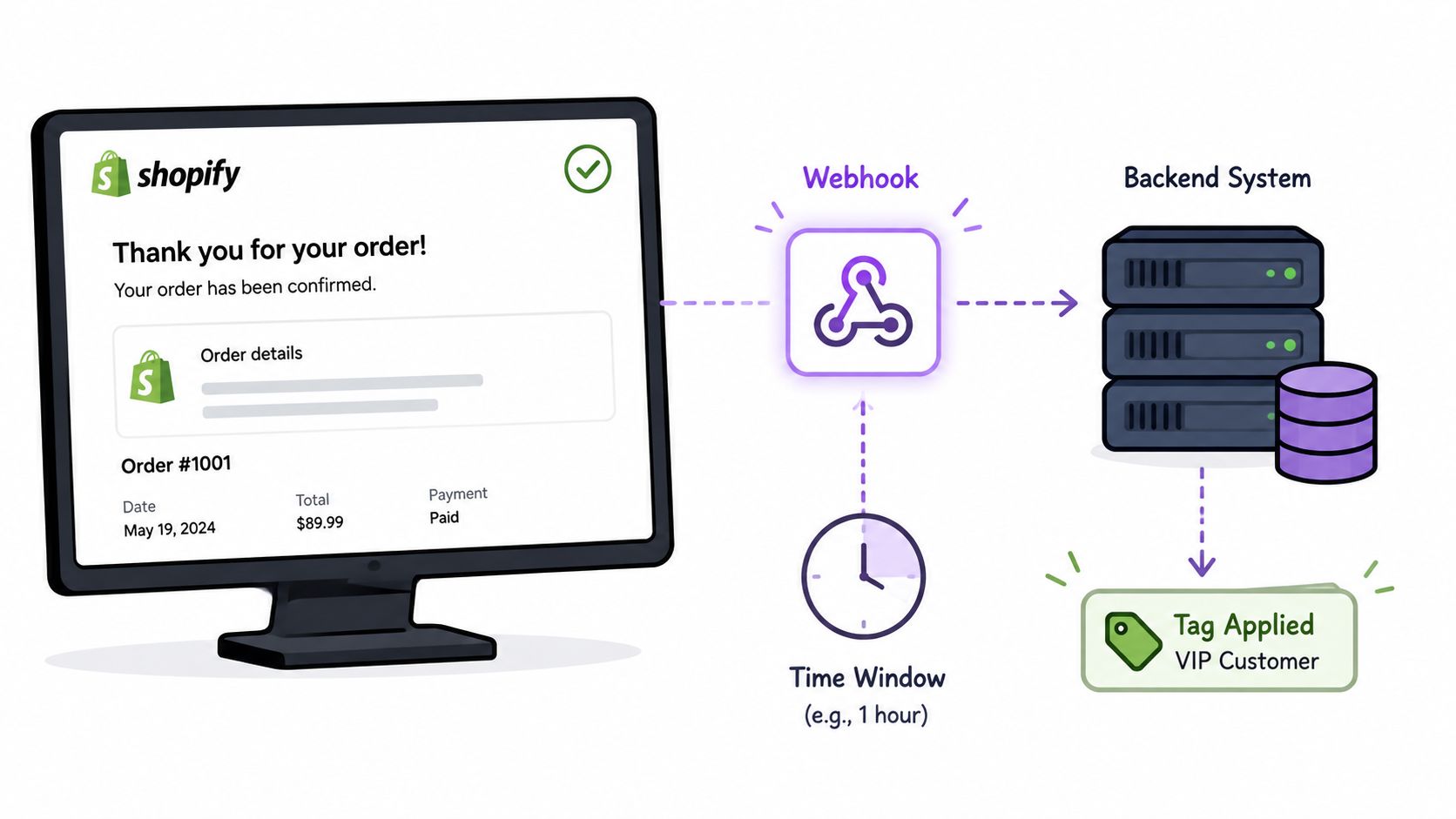
A customer edits a shipping address within the merchant's permitted post-purchase window. The webhook consumer records the event, checks whether fulfillment has crossed the point where changes are allowed, validates the address, and routes the order for review or synchronization.
A trimmed event might look like this:
{"event_id": "evt_789","topic": "orders/updated","order_id": "gid://shopify/Order/123","changes": {"shipping_address": true,"email": true}}The handler should not assume that shipping_address: true means the new value is safe to apply. Fetch or use the authoritative state required by your workflow, compare the order's current status, and record who or what approved the change. Google Maps validation and autocomplete can prevent malformed addresses when the customer edits delivery details, while product restrictions can keep order changes within merchant-defined boundaries.
If the event is duplicated, the same order should remain in the same approved state. If an older event arrives after a newer one, the consumer needs a version, timestamp, or reconciliation check before overwriting current data.
Order tagging and operational routing
Tags are effective routing signals when their meaning is precise. An address correction can add a tag such as customer_address_changed, allowing Shopify Flow or an internal worker to notify fulfillment, hold an order for review, or update a warehouse queue.
A simplified payload could be:
{"event_id": "evt_790","topic": "orders/updated","order_id": "gid://shopify/Order/123","customer": {"id": "gid://shopify/Customer/456","vip": true},"action": "apply_routing_tag"}The tag operation should be idempotent. If the tag already exists, the worker records that the desired state is present rather than creating another side effect. Use separate tags for customer intent, operational status, and error conditions so agents can tell whether an order needs action or merely contains historical context.
A collection of Shopify Flow examples can help teams translate customer changes into repeatable routing rules without embedding every branch in custom code.
Thank You page upsell triggers
A post-purchase upsell starts with a different constraint. The customer has completed checkout, so the system must preserve the original order context and apply product, inventory, payment, and fulfillment rules before adding anything.
A conceptual event might contain:
{"event_id": "evt_791","topic": "post_purchase_offer_accepted","order_id": "gid://shopify/Order/123","product_id": "gid://shopify/Product/999","quantity": 1}The consumer checks whether the offer was already accepted, whether the product is eligible, and whether the existing order can be edited. It then records the result, including a rejected outcome, so support can explain what happened. The same idempotency key must protect the order-edit operation from duplicate webhook delivery.
At scale, this matters because events can arrive more than once or out of order. Guidance on webhook reliability, idempotency, retries, and engineering reference patterns recommends idempotency keys, durable queues, DLQ handling, and periodic reconciliation. Those controls are especially important when a post-purchase workflow changes money, fulfillment, or customer-visible order state.
Securing Testing and Troubleshooting Your Webhook Flows
A webhook can be correctly registered and still fail in production. The endpoint may be behind a WAF that blocks a legitimate request, a CDN may apply an unsuitable timeout, a secret may be misconfigured, or the worker may process an older event after a newer one. Troubleshooting gets much faster when the system records enough evidence to distinguish delivery failure from processing failure.
Secure the boundary
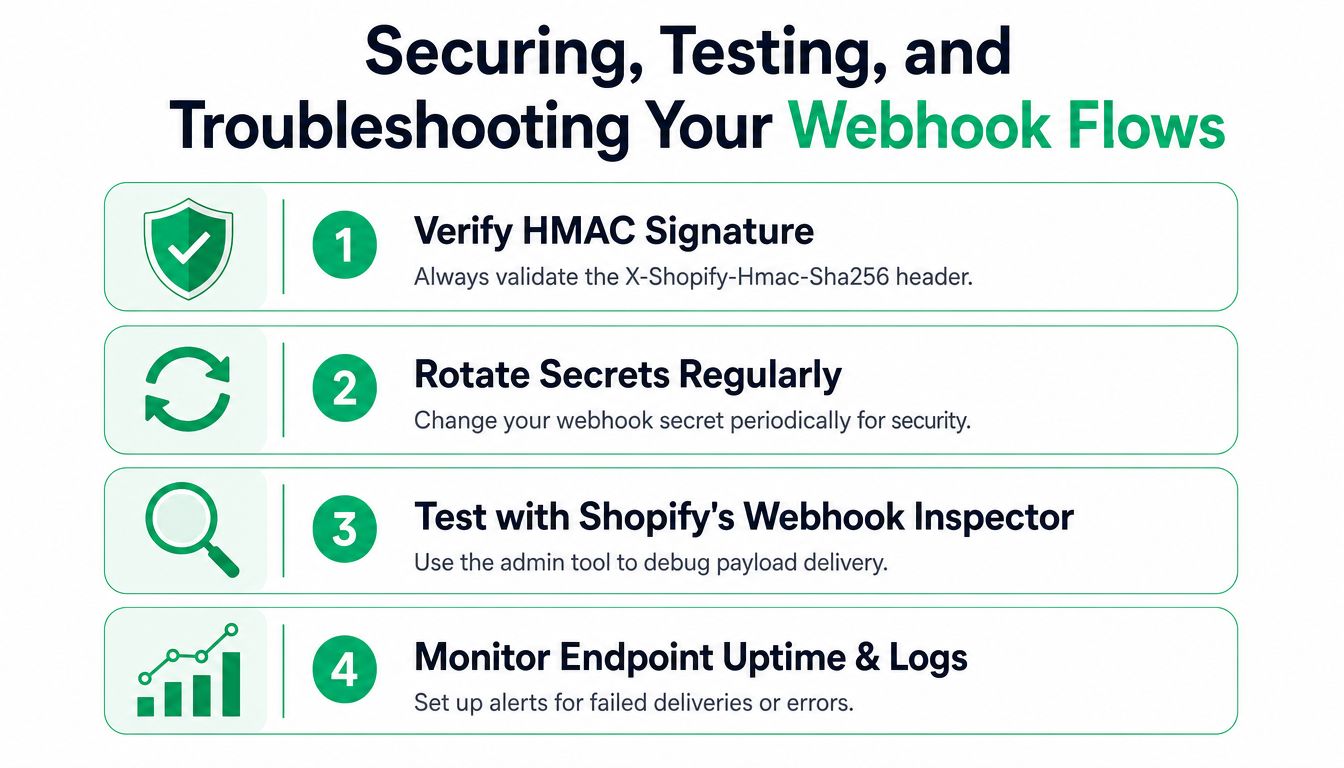
Verify the HMAC-SHA256 signature before parsing business fields or enqueueing work. Keep secrets outside source control, restrict access to them, and plan rotation so old and new credentials can be handled during a controlled transition. Log a safe request fingerprint and event identifier, not the secret or unnecessary customer data.
Treat the webhook endpoint as a narrow ingestion boundary. It should validate the shop context, reject unsupported topics, limit payload exposure in logs, and avoid returning detailed internal errors to the sender. Authentication errors, schema errors, and downstream failures should have distinct internal categories even when the public response is intentionally simple.
Test the full path, not only the request
Use Shopify's development and inspection tools to send representative payloads, including updates with missing optional fields, repeated identifiers, and changes that arrive in an unexpected order. A successful HTTP response only proves that the receiver accepted the request. It doesn't prove that the queue stored the job, the worker completed it, or the downstream system reflected the intended state.
A practical test matrix includes:
- Signature validation: Confirm valid requests pass and modified bodies fail.
- Duplicate delivery: Send the same event again and verify that side effects don't repeat.
- Transient dependency failure: Make a downstream service unavailable and inspect backoff, retry limits, and queue behavior.
- Permanent failure: Send an invalid business state and confirm the job reaches a useful failure path.
- Replay: Reprocess a DLQ item and verify that the current order state is checked before mutation.
Keep an operator's runbook
Log event receipt, verification result, enqueue status, processing start and finish, attempt number, downstream response, and final state. Track delivery success, retry rate, queue depth, DLQ volume, and p95 or p99 handler latency. Alerts should point to an action, such as inspecting a queue, checking a dependency, or replaying a known-safe event.
Operational visibility remains one of the most underdeveloped parts of webhook automation. Practitioners frequently encounter delayed or missing deliveries, unclear authentication errors, and interference from WAFs, CDNs, and bot-protection systems, as discussed in this community discussion about webhook observability and debugging.
When an order doesn't update, trace it in this order: confirm Shopify emitted the event, locate the delivery record, verify the signature result, check persistence, inspect the queue attempt, review the downstream response, and compare the final Shopify state with your internal state. If the event is absent, investigate the subscription. If it exists but never reached the queue, inspect the endpoint and infrastructure. If it reached the worker, use the error classification and replay record rather than guessing.
Simplifying Webhook Automation with SelfServe
Custom webhook automation makes sense when a merchant has a unique process, a proprietary order-management system, or a downstream action that needs precise control. It also creates ownership: your team must maintain subscriptions, verify signatures, handle duplicates, operate queues, review DLQs, and reconcile state when vendors deliver late or out of order.
For common post-purchase workflows, a focused Shopify app can reduce that surface area. SelfServe supports customer-managed post-purchase changes within merchant-defined permissions and windows, multilingual widget experiences, address validation with Google Maps, product restrictions, automated order tagging, and manual cancellation queues with approval flows. Its upsell modules can present curated products or collections on the Thank You and Order Status pages, while tagging can connect customer changes to downstream Shopify Flow automation.
That doesn't eliminate the need for engineering judgment. You still need to decide which edits are allowed, when fulfillment takes precedence, which products can be added, and how support should handle exceptions. The advantage is that the recurring mechanics of the customer experience and its related operational signals don't all need to be built as bespoke webhook consumers.
A practical approach is to start with the workflows that have clear rules and frequent repetition, then reserve custom webhook code for uniquely differentiated logic. For example, use an app-managed order-editing experience for controlled address changes, and add a custom integration only where your 3PL, ERP, or internal risk system requires a specialized event contract. SelfServe installs from the Shopify App Store, offers a 30-day free trial, and higher-tier plans include dedicated account management, 3PL or ERP integrations, and custom upsell flows.
The right choice is the one your operations team can observe, recover, and explain. A smaller automation that has reliable deduplication and a documented recovery path is more valuable than a broad integration that fails without clear error signals.
SelfServe gives Shopify and Shopify Plus merchants a controlled way to manage post-purchase edits, address validation, order tagging, cancellations, and upsells without building every customer-facing workflow from scratch. Visit SelfServe to explore the 30-day free trial and connect reliable post-purchase automation to your store.