Transform Shopify with a Shipping Tracker App
Your team ships orders on time. Customers still email support asking where their package is, whether it's stuck, and if the delivery date can be trusted. Support agents copy tracking links into replies all day, while customers land on carrier pages that look nothing like your store and answer the wrong question.
That's the gap many Shopify brands miss. The problem isn't only shipment visibility. It's post-purchase control.
A good shipping tracker app doesn't just show movement. It gives customers a branded place to check progress, reduces repetitive support work, and creates a high-attention touchpoint after checkout, when buyers are still engaged with your brand. If you're still sending shoppers to default carrier tracking pages, you're leaving customer confidence, support capacity, and post-purchase revenue on the table.
Beyond "Where Is My Order?"
The pattern is easy to spot in fast-growing stores. Orders go out, volume rises, and the support queue starts filling with the same message in different forms. Where is my order. Has it shipped. Why does the carrier page say label created. Is it arriving today or not.
None of those tickets are surprising. They're a direct result of handing your post-purchase experience to carriers whose systems were built for logistics, not customer reassurance.
A customer buys from your brand, gets your order confirmation, and then gets pushed into a fragmented experience. The next update may come from Shopify, a carrier email, a text message, or a third-party tracking page. If the parcel changes hands, crosses borders, or sits between scans, confidence drops fast.
The customer isn't asking for raw tracking data. They're asking whether they can trust what they're seeing enough to plan around it.
That distinction matters. A shipping tracker app becomes the place where your customer stops guessing. Instead of bouncing between carrier pages, they get one branded destination for order progress, delivery messaging, and next actions.
For operations teams, this changes the economics of support. Repetitive ticket volume drops when customers can self-serve status checks. Agents stop wasting time on copy-paste responses and can focus on exceptions that need judgment, such as lost packages, failed delivery attempts, or replacement decisions.
What default carrier tracking gets wrong
Carrier pages are useful for internal shipment movement. They're weak as a customer experience layer.
- They're off-brand. The buyer leaves your store the moment reassurance matters most.
- They're inconsistent. One carrier shows detailed scans, another shows almost nothing.
- They're reactive. Customers check only after they're already anxious.
- They don't support revenue. A carrier page won't cross-sell, educate, or reinforce loyalty to your brand.
A shipping tracker app fixes that by turning a support burden into a structured customer journey. That's why mature Shopify teams stop treating tracking as a utility and start treating it as part of retention.
How a Shipping Tracker App Works
Think of a shipping tracker app as mission control for post-purchase delivery data. It doesn't just paste a carrier link into an email. It pulls shipping events from multiple systems, interprets them, and presents them in a way customers can easily understand.
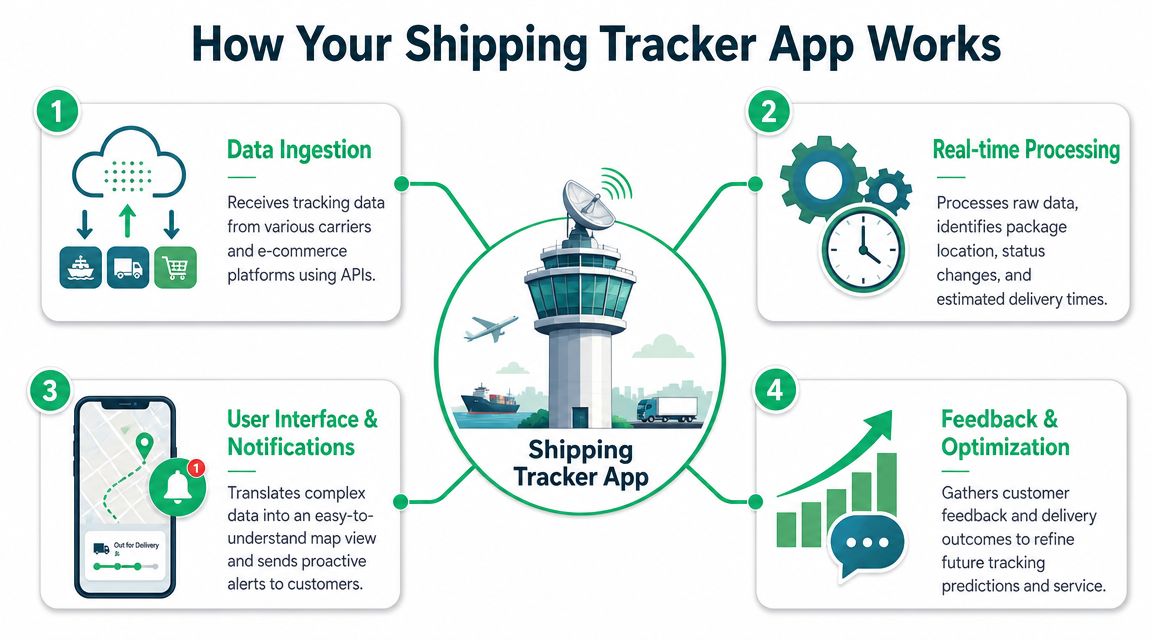
At a technical level, the strongest setup combines carrier and API integration with event-driven location updates instead of manual status entry. Industry guidance on shipment tracking software development describes systems that use barcode scanning, GPS, RFID, and shipping company integrations to keep shipment status current from warehouse departure through final delivery. In practice, that means the app backend has to ingest different event types and normalize them into one tracking timeline.
The four moving parts
The app usually works through four layers.
Order intake
After checkout, the app receives order and fulfillment data from Shopify. That includes order number, items, shipping method, and tracking numbers once the order is fulfilled.Carrier event collection
The app connects to carriers or intermediaries and pulls tracking events as they happen. Those events may include pickup, in-transit scans, local facility arrivals, out-for-delivery updates, delivery confirmation, or exception states.Normalization and logic
This functionality is what separates strong apps from basic ones. Carrier data is messy. Different carriers use different event labels, timestamps, and update quality. The app maps those into a cleaner customer-facing timeline and decides what the shopper should see.Customer display and automation
The app publishes that timeline on a branded tracking page and can trigger notifications when status changes occur.
Later, when you compare vendors, this distinction becomes important. A lightweight tracker gives customers a prettier link. A stronger one becomes a true package tracking software option for Shopify brands because it consolidates fragmented logistics data into a usable post-purchase experience.
A short walkthrough helps make that concrete:
What works and what doesn't
What works is event-driven tracking. When a parcel gets scanned, handed off, delayed, or delivered, the system reacts to those events and updates the customer view.
What doesn't work is relying on static fulfillment messages or manually updated order notes. Those approaches break as soon as volume rises, multiple carriers enter the mix, or support has to explain scan gaps one customer at a time.
Practical rule: If your tracking experience depends on agents checking carrier websites manually, you don't have a scalable post-purchase system. You have a support workaround.
Unlock the Strategic Benefits for Your Store
The biggest mistake merchants make is treating tracking as a cost of doing business instead of a lever. A shipping tracker app can reduce ticket pressure, improve customer trust during the most anxious part of the journey, and create one of the few post-purchase pages customers actively revisit.
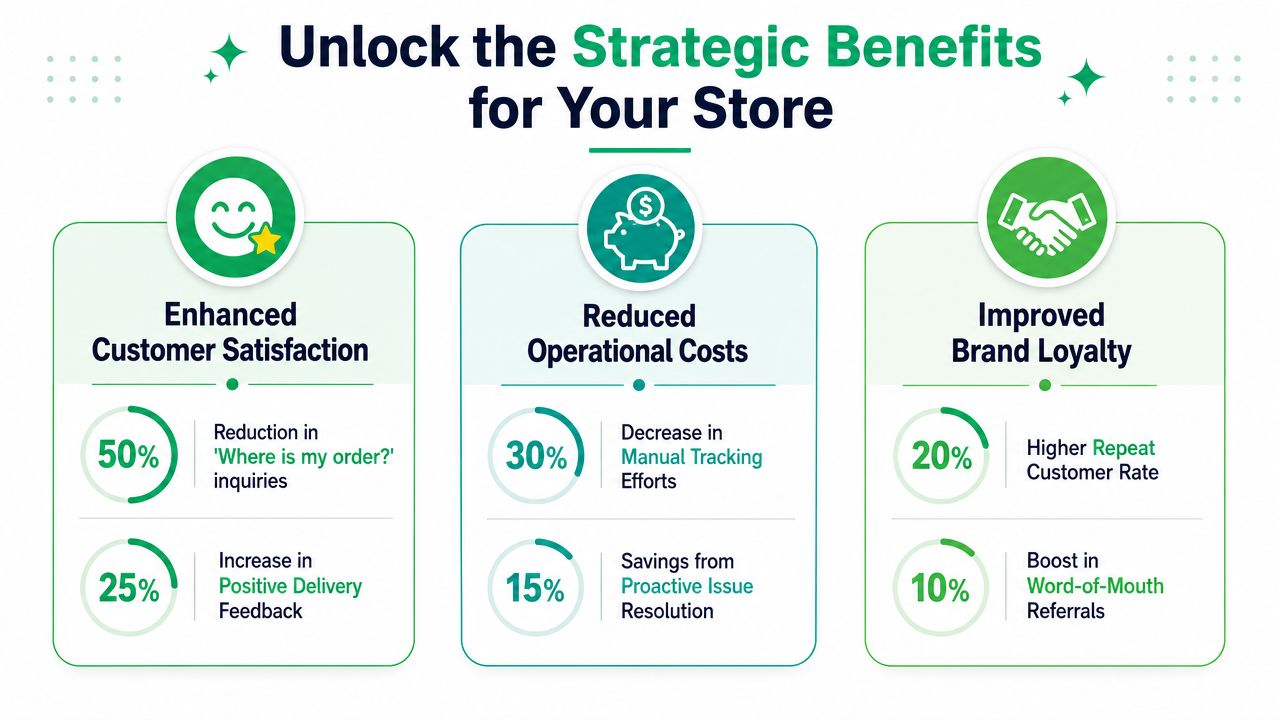
Fewer support tickets without lowering service quality
Most WISMO tickets exist because the customer has to ask. They don't know where to look, they don't trust what they see, or the last update is too vague to be useful.
A branded tracking page changes the flow. Instead of contacting support first, the customer checks a familiar destination that already has the order context. That reduces repetitive conversations and gives support agents cleaner escalation paths when something goes wrong.
The benefit isn't that customers stop caring about delivery. The benefit is that they can self-serve routine answers and contact your team only when intervention is needed.
Better customer experience in the last mile
The hardest part of package tracking isn't always broad visibility. It's trust and precision in the last mile.
Public app-store messaging in this category highlights broad multi-carrier coverage, including Route's claim of support across 600+ carriers on its Google Play listing. That's useful context because it shows how fragmented the ecosystem is. It does not solve the harder merchant problem, which is whether the ETA is reliable enough for the customer to plan around after scan delays, handoffs, or label creation.
That's where strong post-purchase design matters. If your tracking experience only republishes carrier statuses, you're still passing uncertainty straight through to the customer. If it translates those signals into clearer expectations, issue messaging, and proactive alerts, customers feel informed instead of stranded.
For a broader look at how this fits into retention and service design, it helps to think in terms of the full post-purchase customer experience for ecommerce, not just package movement.
When customers trust the delivery message, they buy patience. When they don't, they open tickets.
A revenue surface most brands underuse
Your order tracking page gets attention. Few pages after checkout do.
That makes it valuable real estate for:
Cross-sells that fit the original order
Accessories, refills, or complementary products can appear without interrupting delivery clarity.Content that reduces returns
Care instructions, setup guides, sizing reminders, or usage tips can help the customer get more from the purchase.Lifecycle nudges
You can direct buyers toward subscriptions, loyalty programs, or product education while they're already engaged.
The key is restraint. The page should answer delivery questions first. Revenue modules work best when they feel helpful, not when they crowd out tracking information.
Essential Features Your Shipping Tracker App Needs
A lot of Shopify apps claim to handle tracking. Many of them only improve presentation. That's not enough if you're dealing with multiple carriers, international orders, support SLAs, and a brand standard you want to protect.
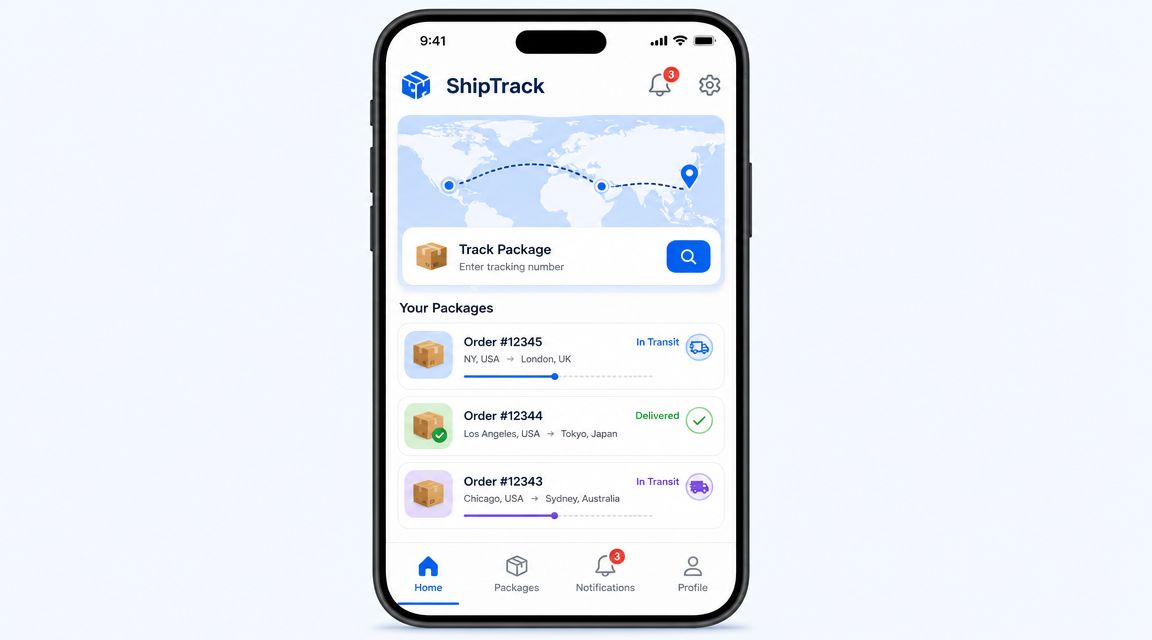
Multi-carrier coverage with clean status logic
If your store uses more than one carrier, or expects to, this isn't optional. The app needs to pull events from the carriers you already use and present them in a consistent timeline.
What matters isn't just whether the app “supports carriers.” It's whether support is deep enough to handle handoffs, exceptions, and uneven scan quality without confusing the customer. A package that moves from one network to another often creates the exact uncertainty that triggers support tickets.
Look for a system that translates carrier-specific language into simple states your customer can understand.
Branded tracking pages that feel like your store
A tracking page should look like it belongs to your brand. That means your logo, colors, tone, and navigation choices should be present without making the page cluttered.
A customer who lands on a generic carrier page often feels like they've left the buying experience. A customer who lands on a clean branded page stays in your ecosystem.
Prioritize these basics:
- Brand consistency
Your page should match the rest of your Shopify storefront closely enough that it feels continuous. - Clear status hierarchy
Delivery status, expected arrival messaging, and issue flags should be immediately visible. - Mobile readability
A large share of tracking checks happen on phones. Dense layouts fail here quickly.
Proactive notifications instead of passive checking
Customers shouldn't have to keep refreshing a page to know whether something changed. Good apps push updates by email, SMS, or other channels you already use.
The strongest setups send useful messages at moments that matter, such as shipment dispatched, out for delivery, delayed, delivery attempted, and delivered. This helps in two ways. It reduces inbound questions, and it gives your brand another chance to communicate clearly when expectations shift.
Helpdesk and ops integrations
Tracking data is most valuable when your team can act on it without jumping between tabs.
A practical setup connects your tracking workflow with the systems your team already lives in, such as your helpdesk, ERP, 3PL tools, or customer messaging platform. When an agent opens a ticket, they should see current fulfillment context immediately. When operations reviews shipping issues, they should be able to spot patterns without manual lookup.
A shipping tracker app earns its keep when it shortens the path between “customer has a question” and “team has the answer.”
Address quality and delivery error prevention
Many delivery problems start before the parcel moves. Incomplete apartment details, formatting issues, and typo-filled addresses create failed deliveries that later get treated as carrier problems.
A capable post-purchase stack should help prevent those errors through validation, standardization, and customer correction workflows where appropriate. If your volume is high, this matters more than most merchants realize because every preventable address problem creates downstream support work.
International and multilingual readiness
Global stores need more than translated storefront pages. Customers also need understandable delivery communication after checkout.
A shipping tracker app should support multilingual experiences where needed, especially for notifications and customer-facing status pages. If a shopper can buy in one language but gets post-purchase communication in another, confusion rises at exactly the wrong moment.
Best Practices for Implementation and UX
Merchants often install a tracking app, switch on a branded page, and assume the job is done. That leaves a lot of value unrealized. Setup decisions determine whether the app becomes a clean self-service layer or just another tab your support team still has to explain.
Start with operations, not design
The first step is mapping your real fulfillment flow. List your carriers, shipping methods, exception types, international lanes, and any points where packages commonly stall. Then confirm how the app handles each one.
If you skip this, you'll end up with a nice-looking page that breaks the moment an order moves outside the happy path. Brands dealing with local couriers, 3PL handoffs, or split shipments need to test those scenarios before rollout.
A useful prep checklist looks like this:
- Carrier mapping
Confirm which carriers you use now and which you may add during peak periods. - Exception review
Identify common situations such as delayed scans, failed delivery attempts, or customs-related holds. - Support workflow alignment
Decide when the customer should self-serve and when a ticket should be encouraged.
If your team handles complex delivery workflows, studying how last-mile carrier tracking for ecommerce operations fits into your support playbook can prevent a lot of confusion later.
Design the page for reassurance first
The best tracking pages don't overload customers with logistics jargon. They present only what helps the buyer understand progress and next steps.
Use a simple visual timeline. Show the current status clearly. If there's uncertainty, explain it plainly instead of hiding behind generic language. “Label created” without context often creates more anxiety than silence. A better customer experience explains that the order has been processed and is waiting for the carrier's first acceptance scan.
Here's what to place near the top of the page:
- Order identity
Order number, items, and destination summary. - Current delivery state
A plain-English status that matches what the customer wants to know. - Expected next event
If the order is in transit, say what the shopper should watch for next.
Keep upsells secondary and relevant
Yes, the tracking page can generate revenue. No, it shouldn't feel like a billboard.
Place recommendation modules lower on the page or beneath the core tracking block. The customer came for certainty first. Once you've delivered that, related add-ons or educational content can work well.
Don't make the customer hunt for shipment information because a marketing block took the prime position.
Roll out in phases
A full launch across every order type can create avoidable chaos. Start with a slice of your volume, review customer reactions, and inspect support tickets for confusion patterns.
Watch for practical issues such as mismatched statuses, timing gaps between carrier scans and page updates, or messages that sound clear internally but confuse buyers. Good UX comes from tightening those edges, not from adding more widgets.
How to Evaluate and Choose the Right App
By the time you start demos, most vendors will sound similar. They'll all promise visibility, branding, and automation. The difference shows up when you compare how each app fits your operation, not when you read feature bullets in isolation.
Use a scorecard and make your team fill it out separately. Operations, support, and ecommerce managers often care about different failure points. That's useful. It exposes where an app may look strong in a demo but weak in day-to-day use.
Questions worth asking in every demo
- How does the app handle carrier handoffs and vague statuses?
- Can the page stay useful when a package hasn't been scanned recently?
- What can support agents see without leaving their workspace?
- How customizable is the tracking page without development work?
- Can the system support the countries, languages, and carriers you use?
- What happens during peak periods when you add new carriers or routing rules?
Shipping Tracker App Evaluation Checklist
| Evaluation Criteria | What to Look For | App 1 Score (1-5) | App 2 Score (1-5) |
|---|---|---|---|
| Carrier compatibility | Supports your current carriers and likely backup carriers | ||
| Tracking quality | Clear event normalization, exception handling, useful statuses | ||
| Branding control | Custom page design, domain consistency, messaging flexibility | ||
| Notification options | Triggered alerts across the channels your brand uses | ||
| Support integration | Easy access for agents inside helpdesk or ops workflows | ||
| International readiness | Works well across languages and cross-border shipping flows | ||
| Revenue features | Ability to add cross-sells or post-purchase content cleanly | ||
| Ease of setup | Fast rollout without heavy engineering dependency | ||
| Scalability | Can grow with more order volume, carriers, and workflows | ||
| Vendor support | Responsive onboarding help and practical problem solving | ||
| Pricing fit | A pricing model that makes sense for your shipment profile |
A final caution. Don't choose based only on the prettiest tracking page. If the backend logic is weak, support still ends up doing manual interpretation. The page looks polished, but the operation remains fragile.
Measuring Success and Taking the Next Step
A shipping tracker app is worth adopting when it changes outcomes you can see in the business. Start with the basics. Track WISMO ticket volume, average handling time for shipment-related conversations, and the share of support contacts that involve delivery confusion rather than real exceptions.
Then look at customer behavior. Review engagement with your tracking page, click-through on post-purchase offers, and whether shoppers interact with educational content placed there. If your team runs customer satisfaction surveys, watch for delivery-related comments before and after rollout.
Don't overcomplicate the first phase. Audit your current post-purchase journey, identify where customers lose confidence, and compare at least two apps using the checklist above. Then run a trial with real orders and inspect the support queue closely. The right app won't just show package movement. It will give your customers confidence and give your team time back.
If your Shopify store wants to reduce support workload while improving the post-purchase experience, SelfServe is worth a close look. It helps customers manage post-purchase changes within rules you control, supports multilingual experiences, validates addresses in real time, and adds upsell opportunities on key post-purchase pages. For brands trying to turn operations efficiency into better customer satisfaction and higher order value, it's a practical next step.