Shopify Line Item Properties: Guide to Personalization
A customer places an order with three personalized items. An hour later, support gets the email everyone dreads: “Can you add a gift message to just one of them, and also change the delivery instruction for the other?”
If the order was built with the right data structure, that request is manageable. If it wasn't, your team starts improvising. Someone adds an order note. Someone else pings fulfillment in Slack. The warehouse sees one message, the customer meant another, and the problem gets expensive fast.
That's where Shopify line item properties earn their keep. They let you attach custom data to a specific item in the cart, instead of dumping everything onto the order as a whole. For operations teams, that distinction matters because fulfillment, personalization, and post-purchase changes rarely happen at the order level. They happen at the product level.
What Are Shopify Line Item Properties and Why They Matter
A customer buys two of the same product, but only one needs engraving. If that instruction sits in an order note, your warehouse has to guess which unit it belongs to. Line item properties prevent that ambiguity by attaching custom data to the specific cart line that needs it.
In practice, line item properties are custom fields stored on an individual item in the cart. They can capture customer-facing inputs like engraving text, gift messages, or upload references. They can also carry operational data such as production instructions, bundle component context, or internal routing values that should stay tied to one product through the order lifecycle.
That distinction affects more than the storefront.
When item-level data is captured correctly, support can see what changed for one product without rereading the whole order. Fulfillment can print or export instructions that belong to the right unit. Automation flows can use the same data for tagging, production handoff, or downstream system sync. For high-volume merchants, that usually means fewer clarification emails, fewer manual notes, and fewer orders that need to be intercepted after they hit the queue.
I usually apply a simple test. If the information changes how one specific item should be made, packed, or fulfilled, store it as a line item property.
The opposite approach creates avoidable friction. Teams end up pushing item-specific instructions into order notes, creating extra variants for options that do not affect inventory, or asking staff to copy details into spreadsheets and Slack threads. Those workarounds hold for a small catalog. They break once orders include multiple personalized items, mixed fulfillment rules, or post-purchase edits.
Line item properties also matter because they persist through systems that do not always handle customization gracefully. The initial capture on the product page is only the first step. The harder part is making sure that data stays readable in cart and order views, survives checkout constraints, and remains usable after purchase when support needs to correct or add detail. That end-to-end handling is where many implementations fall short.
Used well, line item properties give each product line its own operational context. That keeps personalization accurate and gives merchandising, support, and fulfillment a shared source of truth for the same item.
Properties vs Attributes Choosing the Right Custom Data Field
Shopify data problems often start with using the wrong container.
I see this in production stores after the order volume rises. A merchant launches personalization, captures a few custom fields, and everything looks fine until support has to edit an order, the warehouse prints picking slips, or an automation needs to route one item differently from the rest of the cart. At that point, the storage choice affects whether teams can act on the data or have to interpret it.
The simple decision model
Use line item properties when the data belongs to one specific product line. Use cart attributes when the data applies to the whole cart. Use cart notes for a general order message that no system needs to parse reliably.
A quick test works well here. If a customer can buy two of the same product and each one might need different instructions, that data belongs at the line level. If the instruction applies to the shipment as a whole, such as a delivery preference, a cart-level field is usually the better fit.
This decision has operational consequences. The field you choose directly impacts whether support, warehouse, and automation teams can trust the data later.
Line item properties vs cart attributes vs cart notes
| Feature | Line Item Properties | Cart Attributes | Cart Notes |
|---|---|---|---|
| Scope | Applies to a specific item | Applies to the cart or order | Applies to the order as a single message |
| Best use case | Engraving, per-item gift message, internal item ID, production instructions | Delivery preference, campaign context, order-level selections | Freeform customer message about the whole order |
| Granularity | High | Medium | Low |
| Operational clarity | Strong for fulfillment and production | Useful for order-wide routing | Easy to misuse when item detail matters |
| Automation fit | Best when workflows need item-specific logic | Useful for broader order flows | Limited if the message is unstructured |
Line item properties stay attached to the item, which makes them much easier to use across the full order lifecycle. That matters once the order leaves the product page and starts touching support tools, export jobs, ERP syncs, or Shopify Flow logic. If your team plans to automate personalization or enrich product pages with dynamic inputs, this Shopify product page optimization guide is a useful companion read.
When each option works well
- Use line item properties for customization, production instructions, bundling metadata, or any per-item detail that affects fulfillment.
- Use cart attributes for order-wide context, such as requested delivery timing, sales channel context, or a shared gift option.
- Use cart notes when a freeform message is acceptable and nobody downstream needs consistent structure.
The common failure point is storing fulfillment-critical item data in a cart note because it is faster to ship. That shortcut usually creates cleanup work later. On mixed carts, staff have to guess which message belongs to which line, and post-purchase edits become harder because the original instruction was never tied to the item that needed it.
Common architecture mistakes
These patterns create avoidable rework:
- Using variants for open text or unlimited choices. Variants are for defined purchasable options. They become hard to manage when the input is a name, message, upload reference, or custom specification.
- Using notes for structured data. Notes are difficult to validate and difficult to map into automation or external systems.
- Using order-level fields for item-level requirements. This breaks down quickly on orders with multiple personalized products.
- Ignoring downstream consumers of the data. If an AI assistant, search tool, or workflow app needs to read the custom field later, choose a structure that stays consistent. The same principle shows up in this guide to building Shopify AI apps, where clean commerce data determines whether automation is reliable or brittle.
For high-volume merchants, this is less about form design and more about lifecycle control. The right field choice at capture time reduces ambiguity in fulfillment, lowers support overhead after purchase, and gives every downstream system a clearer record of what the customer asked for.
Implementing Line Item Properties on Your Product Page
A common failure pattern shows up after the first personalized orders come in. The product page looks right, customers fill in the field, and support still ends up asking what text belonged on which item because the value never made it into the cart payload.
Line item properties only work if capture, submission, and downstream naming stay aligned. On Shopify, that starts with inputs named with the properties[...] pattern inside the product form, or with a properties object in the AJAX request if the theme adds to cart with JavaScript (Shopify UI guidance for line item properties).
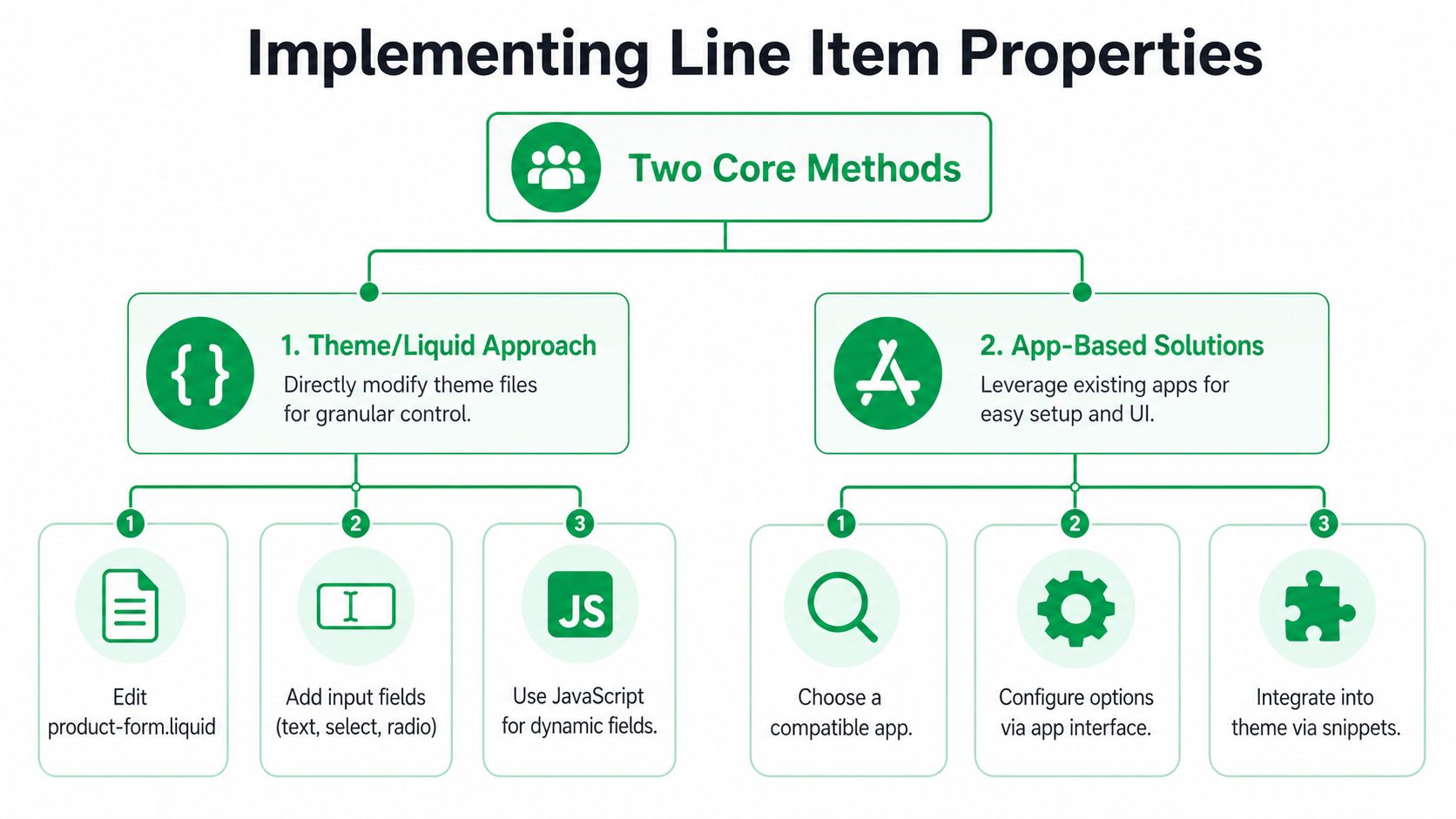
Theme and Liquid form implementation
For a standard theme setup, place every property field inside the same product form that submits the variant to cart. If the input sits outside that form, Shopify will not attach it to the line item.
A simple text field:
<label for="engraving">Engraving</label><inputid="engraving"type="text"name="properties[Engraving]"maxlength="50">A dropdown:
<label for="gift-wrap">Gift wrap</label><select id="gift-wrap" name="properties[Gift Wrap]"><option value="No">No</option><option value="Yes">Yes</option></select>A checkbox:
<label><input type="checkbox" name="properties[Rush Production]" value="Yes">Rush production</label>A hidden internal field:
<input type="hidden" name="properties[_internal_id]" value="{{ product.id }}">That hidden field is useful when operations needs routing data that should stay out of the customer view. Common examples include internal configuration IDs, production template references, or a source tag that helps support trace which form logic created the order line. Use hidden properties for values your team or apps need later, not as a substitute for clean variant architecture.
Required fields and validation
HTML required is a good first layer, but it does not cover every storefront setup. Dynamic sections, custom drawers, accelerated flows, and third-party product form scripts can bypass browser validation or submit incomplete payloads.
<label for="gift-message">Gift message</label><inputid="gift-message"type="text"name="properties[Gift Message]"required>Add lightweight JavaScript validation when the value affects fulfillment, personalization, or SLA handling.
<script>document.addEventListener('DOMContentLoaded', function () {const form = document.querySelector('form[action*="/cart/add"]');const giftMessage = document.getElementById('gift-message');if (!form || !giftMessage) return;form.addEventListener('submit', function (event) {if (giftMessage.value.trim() === '') {event.preventDefault();alert('Please enter a gift message.');}});});</script>I usually recommend pairing validation with field-level constraints that match the actual production limit. If the engraving machine accepts 24 characters, set that limit on the input and in your app logic. Catching bad data on the PDP is cheaper than editing orders, recontacting customers, or remaking units.
AJAX cart implementation
Many current themes submit to /cart/add.js instead of posting the form directly. The rule stays the same. The request still has to include a properties object on the item.
<script>async function addCustomizedItem(variantId) {const engraving = document.getElementById('engraving').value;const giftWrap = document.getElementById('gift-wrap').value;const payload = {items: [{id: variantId,quantity: 1,properties: {"Engraving": engraving,"Gift Wrap": giftWrap,"_source": "product-form"}}]};const response = await fetch('/cart/add.js', {method: 'POST',headers: {'Content-Type': 'application/json'},body: JSON.stringify(payload)});return response.json();}</script>Implementation quality often falters. The visible inputs exist, but the JavaScript reads from the wrong selector, builds the payload before conditional fields mount, or sends different property keys than the back office expects. If a merchant says, "the text box shows on the PDP, but nothing reaches the order," inspect the actual network request first.
Build the form around lifecycle needs
The product page is only the capture point. The bigger question is whether the data will stay useful after checkout, when support, fulfillment, and automation need to read it without guessing.
A practical setup usually follows a few rules:
- Use customer-facing labels that make sense on the cart and order. "Engraving" is better than "Field 1."
- Keep property keys consistent across products and templates. "Gift Message" and "Gift message" should not both exist in the same store.
- Reserve hidden properties for operational metadata. Store IDs, routing hints, and template references are good candidates.
- Design conditional logic so missing values are still interpretable. A blank optional field is easier to handle than three different key names for the same choice.
This is also where storefront UX and operations meet. If the form adds friction, conversion drops. If it captures vague data, fulfillment slows down. Teams revisiting custom-product UX should review this Shopify product page optimization guide before adding more inputs.
For merchants planning app logic around these fields, naming discipline matters even more. The same property keys often feed order editing workflows, ERP mappings, support tooling, or AI-assisted merchandising. This guide to building Shopify AI apps is useful context because it shows how storefront inputs become reliable only when the underlying commerce data stays structured and predictable.
Driving Revenue and Personalization with Line Item Properties
The best use cases for Shopify line item properties don't feel technical to the customer. They feel like the store understood the purchase.
A shopper ordering a personalized mug doesn't care that the engraving text is stored as a key-value pair. They care that the right text shows up on the right product, and that support doesn't need three follow-up emails to get it right.
Per-item gifting in multi-item orders
A common retail problem shows up during holidays and corporate gifting. One order contains several products, but each item needs its own message or recipient context.
If that information sits in a single order note, fulfillment has to guess which message belongs where. With line item properties, each product carries its own gift message, gift-wrap flag, or recipient label.
The benefit isn't abstract. Warehouse teams pack with more confidence, support agents have cleaner context, and the merchant can offer a more premium gifting experience without adding operational chaos.
Configurable products that fulfillment can actually read
Bundles and configurable products often look clean on the storefront and messy in the back office. A customer chooses a base product, selects a finish, adds an accessory, and includes a special production instruction.
Variants can carry some of that logic. They usually shouldn't carry all of it.
Line item properties help separate purchasable options from contextual instructions. That's useful when fulfillment staff, 3PLs, or production vendors need to see exactly how the item should be assembled or packed. It also supports merchandising experiments aimed at increasing basket value. If that's part of your strategy, this guide on how to increase average order value is a practical follow-up.
B2B and operational data on the item itself
B2B orders often need more precision than DTC teams expect. A buyer may need a purchase order reference for only one line, or a custom internal department code tied to a specific item.
That data shouldn't be forced into a broad order message if accounting, approval, or fulfillment work depends on item-level matching. Line item properties make those flows easier to audit because the context stays attached to the product.
This walkthrough gives a useful visual overview of how merchants think about customizations in practice:
Stores usually see the biggest value from line item properties when they treat them as part of the order design, not as an afterthought bolted onto the PDP.
That's a key revenue angle. Better personalization isn't only about offering more inputs. It's about capturing the right data in a form your business can fulfill reliably.
Navigating Checkout and Post-Purchase Limitations
An order comes in for 200 personalized units. Ten minutes later, the buyer emails support asking to change the engraving on just one line. At that point, line item properties stop being a theme feature and start affecting fulfillment accuracy, customer service workload, and whether downstream systems stay consistent.
Capturing line item data is only half the job. Managing it after checkout is where merchants usually run into hard platform boundaries.
The underscore convention and what it actually does
You can prefix a property key with an underscore, such as _internal_id, to keep it hidden in some customer-facing contexts while still storing it on the line item for internal use. Teams use this for routing codes, configuration IDs, or other values that support staff, production teams, or apps need to reference later.
That pattern helps with internal data handling. It does not give full control over how properties appear throughout checkout, nor does it make post-purchase edits easy.
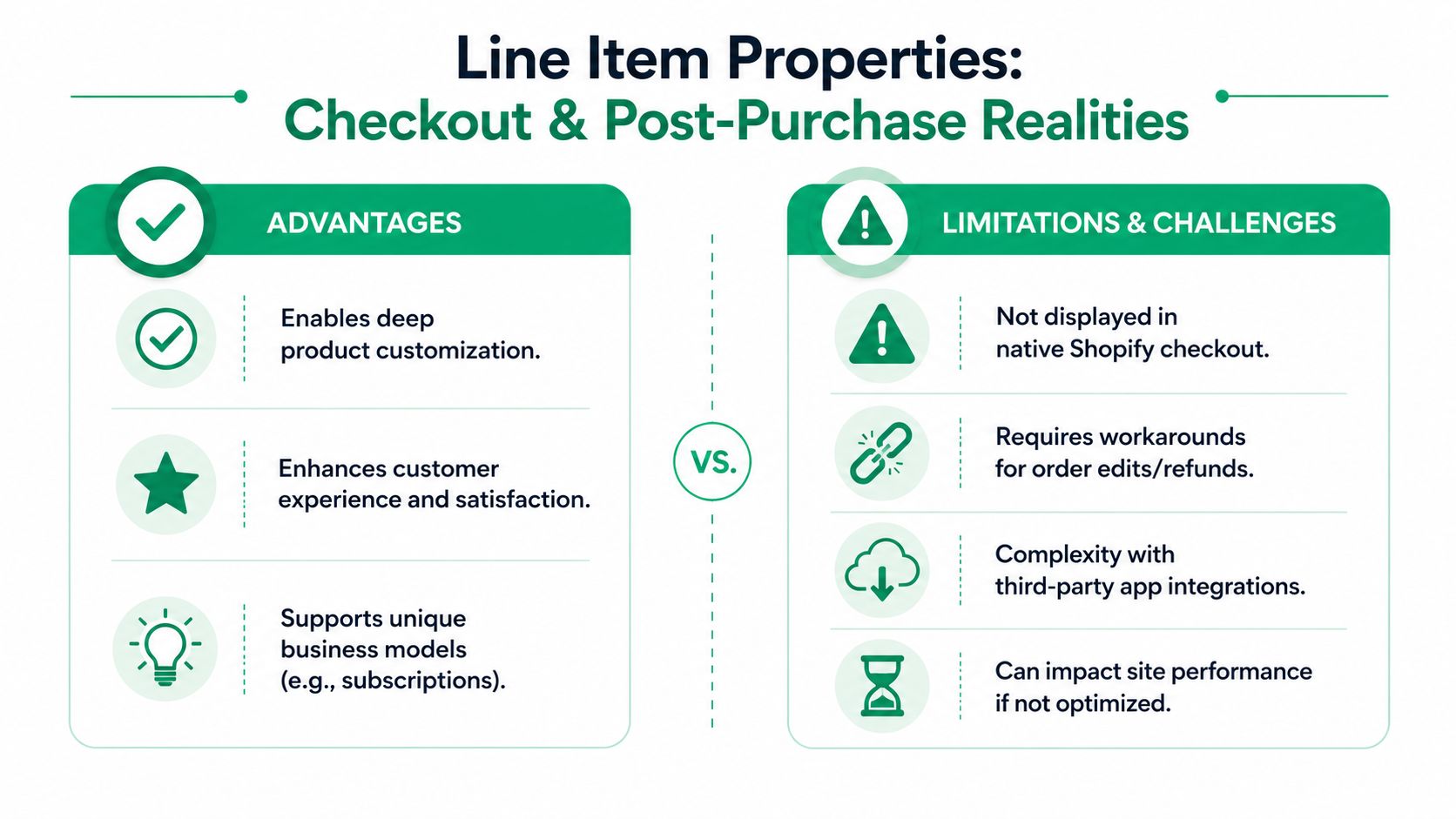
Checkout got stricter after checkout.liquid
Checkout is no longer a reliable place to clean up weak property design. With checkout extensibility replacing older checkout customization patterns, merchants have less direct control over how line item properties are hidden, reformatted, or conditionally displayed during checkout.
For operations teams, the implication is straightforward. If a property should be private, validated, or transformed, handle that before the item is added to cart whenever possible. Waiting until checkout usually means fewer options and more exceptions.
Why post-purchase changes are hard
Support teams often assume line item properties work like editable order notes. They do not.
Once the order is placed, those values may already be flowing into packing slips, admin views, notification templates, fulfillment exports, and automation rules. Change one field casually, and you can create a mismatch between what the customer approved, what the warehouse sees, and what finance or support references later.
That is why a request like “please update the gift message” can become an operational decision. The team has to decide whether to edit the order, recreate the line, contact the warehouse, or leave the original data in place and document an exception.
High-volume merchants face these specific constraints:
- Data has to be right before checkout. The product page carries most of the burden for validation, formatting, and clear instructions.
- Checkout gives limited cleanup options. If the property structure is messy going in, it usually stays messy.
- Line-level edits can break downstream logic. Fulfillment rules, exports, and macros often depend on exact property names and values.
- Customer-friendly changes have backend costs. A simple post-purchase update may require manual coordination across support, warehouse, and operations.
Strong line item property design reduces exception handling. It collects the data the business needs up front, in a format that can survive checkout, fulfillment, and support workflows.
Some merchants address these limits with custom apps, controlled order-edit processes, or post-purchase interfaces. That approach can work, but only with clear rules about what can change after purchase, who owns the update, and which systems need the revised value. If your team is evaluating where Shopify checkout customization stops and custom solutions begin, this guide on how to modify the Shopify checkout page gives useful context.
Troubleshooting and Best Practices for Shopify Plus
A Plus store can collect the right personalization data on the product page and still fail operationally if that data is inconsistent by the time the order reaches support, Flow, the ERP, or a 3PL. On larger catalogs, line item properties stop being a theme detail and become part of order infrastructure.
I've seen one merchant carry three versions of the same field across different templates: Engraving, engraving_text, and Custom Message. Support could read all three. Their automations could not. The result was missed routing rules, broken exports, and manual cleanup on orders that should have flowed straight through.
Where Plus implementations usually break
If a property is missing, malformed, or unreliable, start with the mechanics before you blame Shopify:
- Product form scope. The input has to sit inside the exact form that submits the line item.
- AJAX cart requests. Custom add-to-cart code needs to send the
propertiesobject with the variant payload. - App overrides. Product options, bundles, and upsell apps often replace the native form or rename inputs.
- Input formatting. Open text fields can introduce line breaks, pasted HTML, or inconsistent date formats that look fine on the storefront and create messy order data later.
- Schema drift across templates. A field named
Gift Messagein one template andgift_messagein another will create reporting and automation problems fast.
The fix is usually boring. Standardize the schema, confirm the payload, and test the exact path your customers use.
Treat naming as schema design
High-volume merchants should define line item property conventions before rollout, not after the first support queue spike. Decide which fields are customer-facing, which are operational, and which exist only for internal processing. Then keep those keys identical across themes, forms, apps, and automation rules.
A practical pattern looks like this:
| Property type | Example | Why it works |
|---|---|---|
| Customer visible | Engraving | Readable in cart and order context |
| Operational visible | Delivery Date | Clear for support and fulfillment |
| Internal hidden | _internal_id | Supports systems and automations without cluttering the storefront |
The underscore convention is still widely used for hidden internal properties. It helps keep operational metadata available in order data without adding noise to the customer view. That matters when Flow, exports, or warehouse logic depend on internal values that shoppers never need to see.

Best practices that hold up under order volume
On Shopify Plus, the goal is not just to capture data. The goal is to capture data that survives the full order lifecycle with minimal exception handling.
- Map each property to a downstream use. Know whether it appears in admin views, packing slips, notification templates, exports, warehouse instructions, or Flow conditions.
- Prefer structured inputs over free text. Dropdowns, radios, and validated date fields produce cleaner data than open text boxes.
- Document hidden fields. Internal keys become a support and development risk when only one person understands them.
- Test duplicate and edited lines. Multi-item carts, duplicate products, bundle logic, and order edits expose weak property design quickly.
- Set ownership for changes. If a post-purchase property update affects fulfillment, support should know when to edit, when to recreate a line, and when to stop the warehouse first.
That governance piece is what many line item property guides miss. Plus merchants need a policy for the full lifecycle: capture, validation, downstream usage, and controlled change management after purchase.
If your team is comparing Shopify's flexibility with other platforms, this review of top CMS platforms for small business gives useful outside context. Inside Shopify, the stores that scale cleanly are the ones that treat line item properties as controlled operational data, not as extra product page fields.
A store can tolerate inconsistent merchandising for a while. Inconsistent order data creates fulfillment mistakes, support work, and reporting errors almost immediately.
Unlocking Your Store's Full Potential
Shopify line item properties are one of the most practical tools in the platform. They let you capture item-level detail, support better personalization, and give operations teams cleaner fulfillment data. Their real value shows up across the full order lifecycle, not just on the product page.
That's why mature implementations focus on capture, visibility, automation, and post-purchase control together. If you're comparing platform flexibility more broadly, this roundup of top CMS platforms for small business is a useful outside perspective on how different systems handle extensibility. In Shopify, the stores that get the most from line item properties are the ones that design them as operational infrastructure, not as extra form fields.
If post-purchase changes are creating support tickets or fulfillment risk, SelfServe is worth a look. It helps Shopify merchants give customers controlled ways to update eligible order details after purchase, while keeping merchant rules, workflows, and operational safeguards in place.