Shopify Plus App: A Buyer's Guide for 2026

A flash sale ends on Sunday night. By Monday morning, your support inbox is full of requests to change shipping addresses, swap sizes, remove duplicate items, and cancel orders before the warehouse picks them. Three agents work through the queue while operations asks whether the 3PL has already received the affected orders, and your developer checks whether a manual admin change will trigger the right downstream updates.
That's the core Shopify Plus problem. Checkout design, merchandising, and acquisition still matter, but growth becomes expensive when post-payment operations depend on support tickets and one-off fixes. The right Shopify Plus app stack should make order changes safer, reduce avoidable handling, and keep fulfillment systems aligned.
The Reality Behind a High-Volume Shopify Storefront
A high-volume storefront doesn't become operationally mature because it runs on Shopify Plus. The platform gives a brand a stronger foundation, but the day-to-day customer experience still depends on the tools connected to it.
Monday's inbox usually exposes the weak points first. One customer typed the wrong apartment number. Another selected the wrong size. A third wants to add a product after payment, while the fulfillment team has already started batching orders. Each request looks small in isolation. Together, they create a workload that pulls support, operations, finance, and engineering into the same incident.
Practical rule: If a customer request requires a support agent to open the admin, interpret policy, and coordinate with fulfillment, it belongs in an operational workflow, not an inbox.
The distinction matters because Shopify Plus merchants operate across more than checkout. They manage inventory availability, payment status, subscriptions, returns, warehouse hand-offs, customer communications, and regional storefront requirements. An app that improves only one visible screen may leave the expensive work untouched.
Shopify Plus launched on February 4, 2014 as Shopify's enterprise-ready ecommerce offering, and Shopify later described it as a white-glove solution for high-growth merchants in its official Shopify Plus launch announcement. By 2026, third-party estimates placed the tier at roughly 46,000 to 76,000 live stores worldwide, including major markets such as the United States, the United Kingdom, and Australia, as summarized in the same verified market context.
The stack behind the storefront
The operational layer usually includes:
- Order management: Rules for edits, cancellations, refunds, and approvals.
- Customer communication: Email and account surfaces that make changes understandable.
- Fulfillment coordination: Sync with 3PL, OMS, WMS, and ERP systems.
- Revenue tools: Cross-sells, bundles, subscriptions, and retention flows.
- Monitoring: Logs, alerts, and audit trails that show what happened and when.
Plus merchants already work this way. Independent ecosystem estimates indicate that more than half of Shopify Plus stores had installed key operational apps such as Checkout Blocks and Klaviyo in 2026, while another estimate placed Klaviyo installation at 61.5% of Plus stores. Those figures are reported in the verified ecosystem data, not as a guarantee that any individual store needs those tools.
The buyer's question, then, shouldn't be “Which app has the most features?” It should be “Which operational failure does this app remove, and what happens when the customer changes an order after payment?”
For a broader explanation of the platform and its intended merchant profile, learn what Shopify Plus is. The useful takeaway is simple: treat the Plus app stack as infrastructure. A polished storefront can attract demand, but the stack determines whether your team can absorb it.
What Defines a Shopify Plus App
A customer pays, then notices the shipping address is wrong or wants to add an item. At that point, a Shopify Plus app earns its keep by letting the customer request a safe change without creating duplicate orders, fulfillment errors, or support work.
A Shopify Plus app has two meanings. Broadly, it is any application installed in a Shopify Plus store. For buying decisions, the stronger definition is an app built for Plus merchants' operational complexity, technical permissions, and support expectations.
Installation alone proves compatibility. It does not prove that the vendor understands checkout extensibility, enterprise integrations, access controls, deployment risk, or operational accountability. Judge the app by how it handles order state changes after payment, then assess its other capabilities.
Shopify's post-purchase offer architecture shows the difference between platform access and operational depth. Its dedicated extension point API exposes ShouldRender and Render. The app can determine whether an interstitial should appear, then render an experience that communicates with Shopify to add products to the original purchase. Live stores require access approval, and only Plus merchants can install custom apps using these extensions, as documented in Shopify's post-purchase offer guide.
Compatibility is not the same as depth
Shopify Plus checkout UI extensions on the information, shipping, and payment steps are restricted to Plus plans. Post-purchase pages appear after payment confirmation and before the Thank you page, according to Shopify's checkout product-offer documentation. That placement reaches a high-intent customer moment, but it does not turn an app into an operations platform.
Use this comparison when reviewing vendors:
| Dimension | Regular Shopify App | Shopify Plus App |
|---|---|---|
| Primary fit | Solves a focused merchant problem across Shopify plans | Targets high-volume, complex, or enterprise workflows |
| Platform access | Uses broadly available Shopify APIs and extension points | May use Plus-restricted capabilities and approved extension architecture |
| Operational depth | Often centered on one feature or storefront surface | Connects customer actions to fulfillment, finance, and internal systems |
| Support model | Self-service documentation or standard support | May include implementation, escalation, and account management |
| Deployment risk | Usually manageable with routine testing | Requires rollout planning, monitoring, and dependency checks |
| Buyer test | Does it work? | Does it stay safe and observable under operational pressure? |
Classify the vendor correctly. A public App Store listing offers standardized onboarding. An approved Plus ecosystem partner may provide deeper implementation support. A private app can fit unusual workflows, but your team owns more of its maintenance and long-term reliability.
Teams assessing custom widgets or storefront functionality can check out Magnitude Marketing when weighing build versus buy. The deciding question remains specific: can the app support the order changes your business allows after payment, and can your team see exactly what happened?
Enterprise-Grade Capabilities Worth Paying For
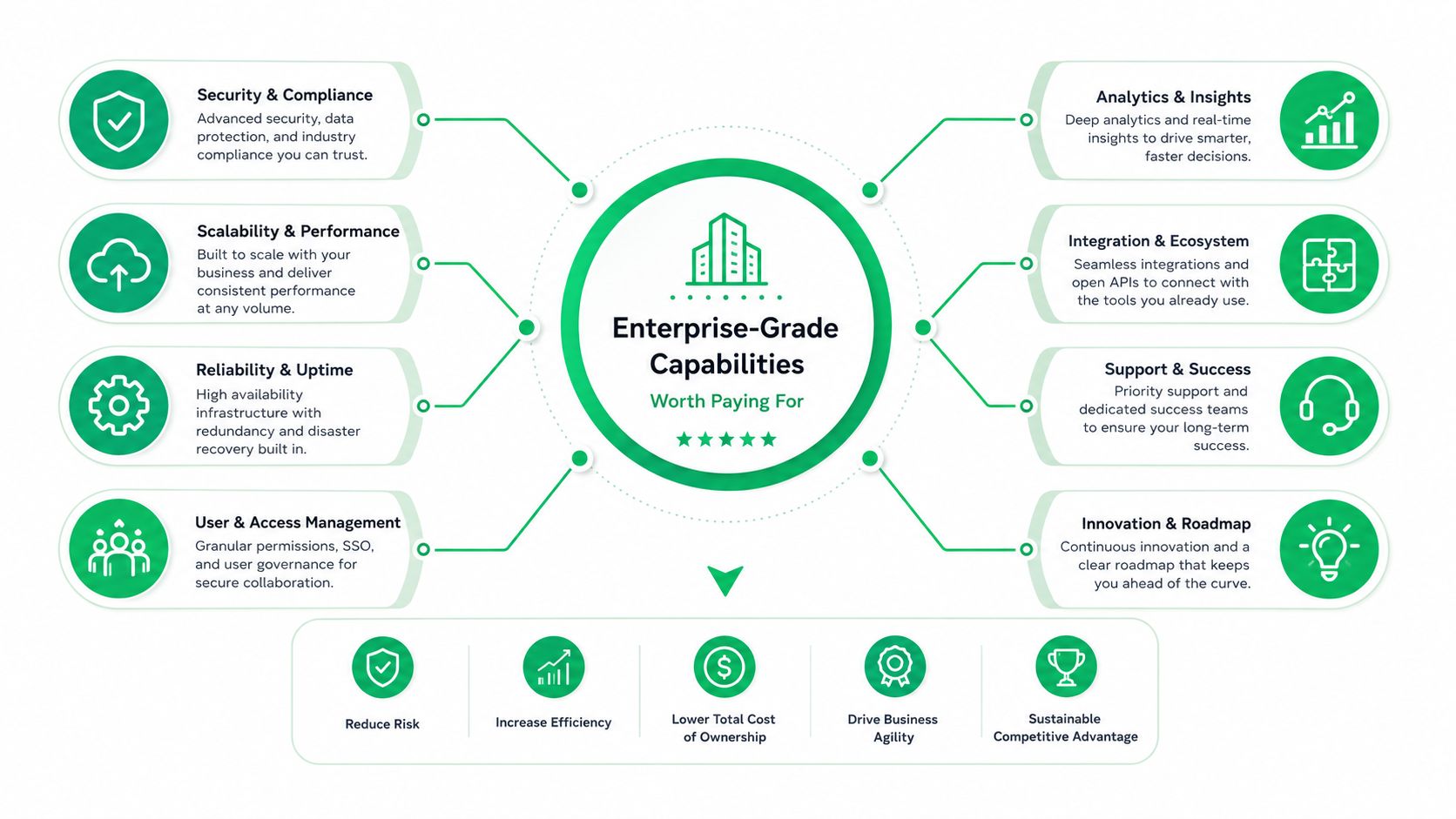
Enterprise capabilities deserve a buyer's scorecard, not a feature checklist. The right question is which failure becomes costly for your particular operating model.
Eight criteria that change the decision
Transaction-volume scalability. The app must handle your busiest order periods without slowing checkout or leaving events stuck in queues. This matters most for promotion-led DTC brands. Ask for load-test evidence rather than accepting “scales with Shopify” as an answer.
ERP and 3PL integrations. Native connections are preferable when edits, cancellations, refunds, and inventory changes need consistent downstream treatment. A global or multi-warehouse merchant should prioritize this before adding another merchandising widget.
A contractual SLA. Uptime language has value only when the agreement defines measurement, response obligations, and remedies. B2B-leaning merchants with internal service commitments should treat the SLA as a procurement document, not marketing copy.
Multilingual and multi-currency support. International brands need customer-facing workflows that match the storefront's language and market context. A translated landing page isn't enough if the order-edit interface remains confusing or incomplete.
Post-purchase editing and self-service. This is the most neglected criterion. Subscription brands, apparel merchants, and any business with address or variant mistakes should prioritize controlled customer edits over another generic upsell placement.
Intelligent upsells and bundles. Revenue features make sense when offers relate to the original purchase and don't interfere with service recovery. They matter more to brands with strong product adjacency than to merchants still drowning in avoidable tickets.
Security and compliance posture. Ask how the vendor handles access, data, payment scope, privacy obligations, and customer deletion requests. SOC 2, PCI scope, and GDPR documentation should be available for review where relevant to your risk profile.
Observability. Logs and audit trails show which customer or agent changed an order, what rule permitted it, and whether downstream systems acknowledged the event. This becomes essential when finance, fulfillment, and support need the same source of truth.
Performance monitoring is part of this evaluation, not a post-launch add-on. A practical companion resource is app performance monitoring for Shopify operations.
What merchants undervalue
Buyers often prioritize the visible feature and postpone operational controls. That order is backwards. Self-service editing, audit trails, integration quality, and escalation support tend to become critical once the app touches live orders and multiple teams depend on its output.
My ranking is direct:
- Most undervalued: Order-state controls, audit history, and downstream synchronization.
- Frequently underestimated: Support escalation and multilingual workflow quality.
- Usually evaluated correctly: Core storefront functionality and basic compatibility.
- Often overvalued: Extra widgets that don't remove a documented customer or operational problem.
Pay for the capability that prevents a costly exception. If the app can't explain how it handles a partial fulfillment, rejected address change, or duplicate webhook, its attractive demo isn't enough.
The Post-Purchase Gap Most App Reviews Miss
Shopify's post-purchase extension API is useful, but it solves a narrower problem than many Plus merchants have. It supports offers after payment and before the Thank you page, including experiences that can add products to the original purchase. That's a strong revenue placement. It isn't a complete customer-facing order-management workflow.
The operational request usually sounds different. “I entered the wrong address.” “Can I change this medium to a large?” “I ordered two by mistake.” “Can I remove the duplicate before it ships?” These requests modify the original order, often after payment has cleared and while inventory or fulfillment status is changing.
A peak-period example
Consider a beauty brand shipping from more than one warehouse. During a peak promotion, a customer notices that an order is going to an old address. A support agent must determine whether the order is still editable, which warehouse owns it, whether the label has been created, and whether the ERP or 3PL has already accepted the shipment instruction.
A post-purchase upsell can offer another serum. It doesn't answer the address problem. A customer-facing self-edit workflow can expose only the permitted changes, apply a time window, validate the address, and send the approved update through the relevant order systems.
That's why the operational workflow often deserves priority. An upsell may improve order value, but a controlled edit can prevent a support interaction, fulfillment error, refund, or avoidable reshipment. The value is not limited to revenue.
| Dimension | Post-Purchase Extension API | Customer-Facing Self-Edit Workflow |
|---|---|---|
| Primary purpose | Present offers after payment | Let customers request or complete permitted order changes |
| Typical timing | Immediately after payment and before the Thank you page | Within a merchant-defined window after purchase |
| Common action | Add a product or accept an offer | Edit address, quantity, variant, product, or cancellation status |
| Operational control | Focused on extension rendering and offer logic | Requires permissions, rules, approvals, and order-state awareness |
| Fulfillment connection | May add to the original purchase | Must coordinate changes with downstream systems |
| Best buyer fit | Brands focused on relevant cross-sells and AOV | Brands focused on ticket deflection and fulfillment accuracy |
Shopify's documentation focuses on upsells and checkout extensions, while independent coverage identifies the absence of native customer self-editing as a recurring Plus gap. The distinction is explored in this post-purchase experience platform overview.
The buying decision should therefore start with the queue you need to reduce. If order edits are a daily operational burden, don't let a polished post-purchase offer demo distract you from the missing workflow.
Evaluating Any Shopify Plus App Before You Install
You can eliminate weak candidates before a sales demo. Ask the same filter questions of every vendor and require evidence in writing.
Start with platform fit
First, verify whether the app uses Plus-specific APIs or approved extension architecture relevant to your use case. Shopify's post-purchase extensions require access on live stores, and custom apps using those extensions are limited to Plus merchants, as covered in the earlier platform documentation. A vendor that can't explain its permissions, installation path, and dependency on Shopify's current extensibility model fails this check.
Next, request a clear integration map. For each system, identify whether the connection is native, API-based, middleware-assisted, or dependent on a fragile automation bridge. ERP, 3PL, OMS, and WMS workflows should have named ownership and failure handling.
Use a pass-or-fail screen
- Load behavior: Pass if the vendor provides relevant testing evidence for your peak workload. Fail if it offers only a generic scalability promise.
- SLA terms: Pass if uptime, response windows, exclusions, measurement, and service credits appear in the contract. Fail if the guarantee exists only on a webpage.
- Data residency: Pass if the vendor explains storage, processing, subprocessors, and regional obligations for your markets. Fail if the answer is “our cloud provider handles it.”
- Localization: Pass if the app supports the languages and currencies your storefront uses. Fail if translations require unsupported custom work.
- Order-state logic: Pass if the vendor demonstrates rules for paid, fulfilled, partially fulfilled, refunded, and cancelled orders. Fail if every order is treated as editable.
- Migration: Pass if the vendor has a written plan for historical rules, active orders, preferences, and integrations. Fail if migration means exporting a spreadsheet and hoping.
- Observability: Pass if your team can inspect logs, event status, and audit history. Fail if support is the only way to learn what happened.
- Upgrade resilience: Pass if the vendor has a documented approach for Shopify checkout and script-editor changes. Fail if the integration depends on an obsolete surface.
- Security review: Pass if the vendor supplies current security and privacy documentation. Fail if it refuses to answer basic access and retention questions.
- Support escalation: Pass if peak-period support is contractually defined. Fail if the vendor can't explain who responds when the issue affects fulfillment.
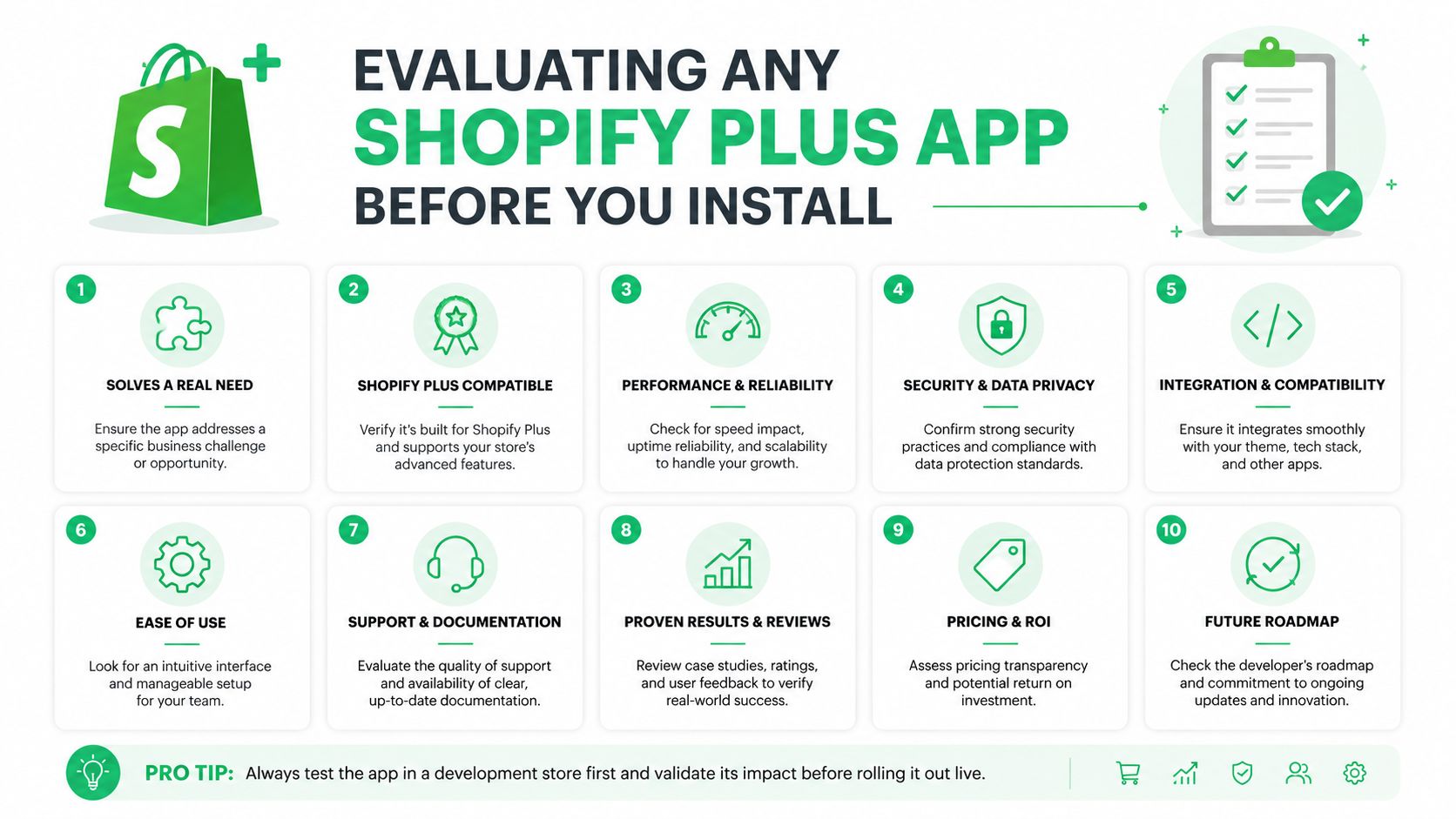
Run this screen before booking a demo. A vendor that passes should earn a technical workshop. A vendor that fails should not consume your implementation calendar.
Implementation, Migration, and Testing
Treat installation, migration, and quality assurance as one rollout. An app that installs cleanly but mishandles an order event in production isn't successful.
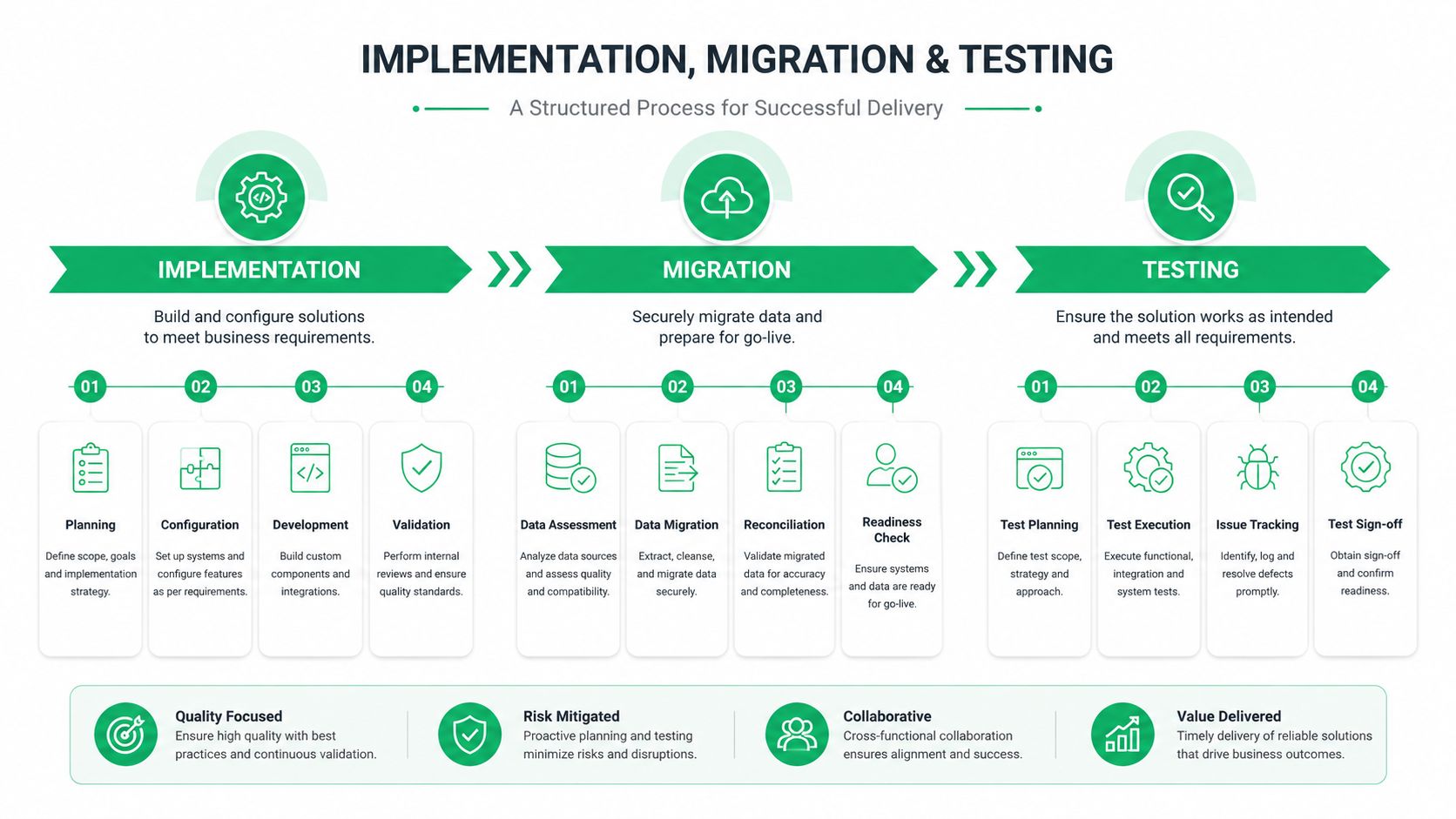
Begin in a sandbox or cloned Plus environment. Reproduce real order states, including payment confirmation, partial fulfillment, cancellation requests, address corrections, variant swaps, refunds, and duplicate event delivery. Ask the vendor to show how it handles API rate limits and webhook idempotency, because a workflow that works once may still fail when Shopify or a downstream system retries an event.
Roll out in controlled stages
A sensible sequence looks like this:
- Map the current workflow. Document who approves edits, when fulfillment locks an order, and which systems receive updates.
- Define the policy. Set editable fields, time windows, product restrictions, cancellation rules, and escalation queues.
- Connect downstream systems. Confirm how the app communicates with the ERP, OMS, WMS, 3PL, payment gateway, and customer messaging tools.
- Test representative orders. Include normal, rejected, delayed, duplicated, partially fulfilled, and already-refunded cases.
- Launch behind a feature flag. Expose the workflow to a limited portion of traffic or a controlled customer cohort before broad activation.
- Review event outcomes. Track failed updates, queue depth, support escalations, refund behavior, and fulfillment acknowledgements.
When replacing a post-purchase vendor, migration includes more than configuration. Inventory any in-flight orders, saved customer preferences, historical refund rules, and subscription contracts touched by the previous app. Preserve the business rules before removing the old integration, and define which system owns each order state during the transition.
A successful install is not proof of production readiness. The proof is correct behavior when the order is late, split, refunded, or already moving through fulfillment.
Test latency during promotional spikes, queue depth on the 3PL side, and correct handling of partial fulfillment. Also test the customer experience on mobile, because the person correcting an address is often acting from an order confirmation email rather than a desktop account page.
Pricing, SLAs, and Support Tiers
App pricing becomes misleading when teams compare only the monthly line item. The cost includes per-order charges, implementation work, support response, integration maintenance, internal training, and the revenue or service impact of an outage.
Use three practical tiers when reviewing a proposal:
| Tier | Pricing Model | Uptime SLA | Support Response | Negotiation Lever |
|---|---|---|---|---|
| Entry | Flat fee or limited usage plan | Standard terms, often with narrow remedies | Business-hours support | Simplify scope and avoid unused modules |
| Growth | Tiered fee based on usage, orders, or features | Defined target with documented exclusions | Priority queue and escalation path | Negotiate volume bands and implementation credits |
| Enterprise | Contracted platform fee, usage terms, and services | Contractual commitment with service credits | Named contacts, escalation, and peak-period coverage | Volume thresholds, renewal protection, and response obligations |
Read an SLA as a service contract. Confirm how uptime is measured, whether planned maintenance is excluded, how incidents are reported, and what credits apply. A two-hour response on an ordinary afternoon isn't equivalent to a two-hour response during your most important promotion, so ask the vendor to describe coverage during your actual peak windows.
Where the economics usually move
Negotiate volume thresholds rather than chasing a lower list price. A small reduction in the headline fee may matter less than a better rate when order volume crosses a band, a cap on usage charges, or implementation support included in the contract.
For a separate example of how a product or service can present pricing options, check RETRO//STRESS cost. The relevant lesson is not to copy another company's model. It's to make the cost structure easy for your finance and operations teams to forecast.
Pay for dedicated account management, certifications, and stack-ranked support when the app controls customer-facing order changes or fulfillment-critical events. Skip the premium tier when the tool is isolated, reversible, and easy for your team to replace. Your contract should reflect operational consequence, not the vendor's preferred package.
Matching the Right App Stack to Your Store Profile
The right stack depends on where operational friction appears. A DTC apparel brand, a multi-brand portfolio, and a wholesale-leaning hybrid may all use Shopify Plus, but they don't need identical tools.
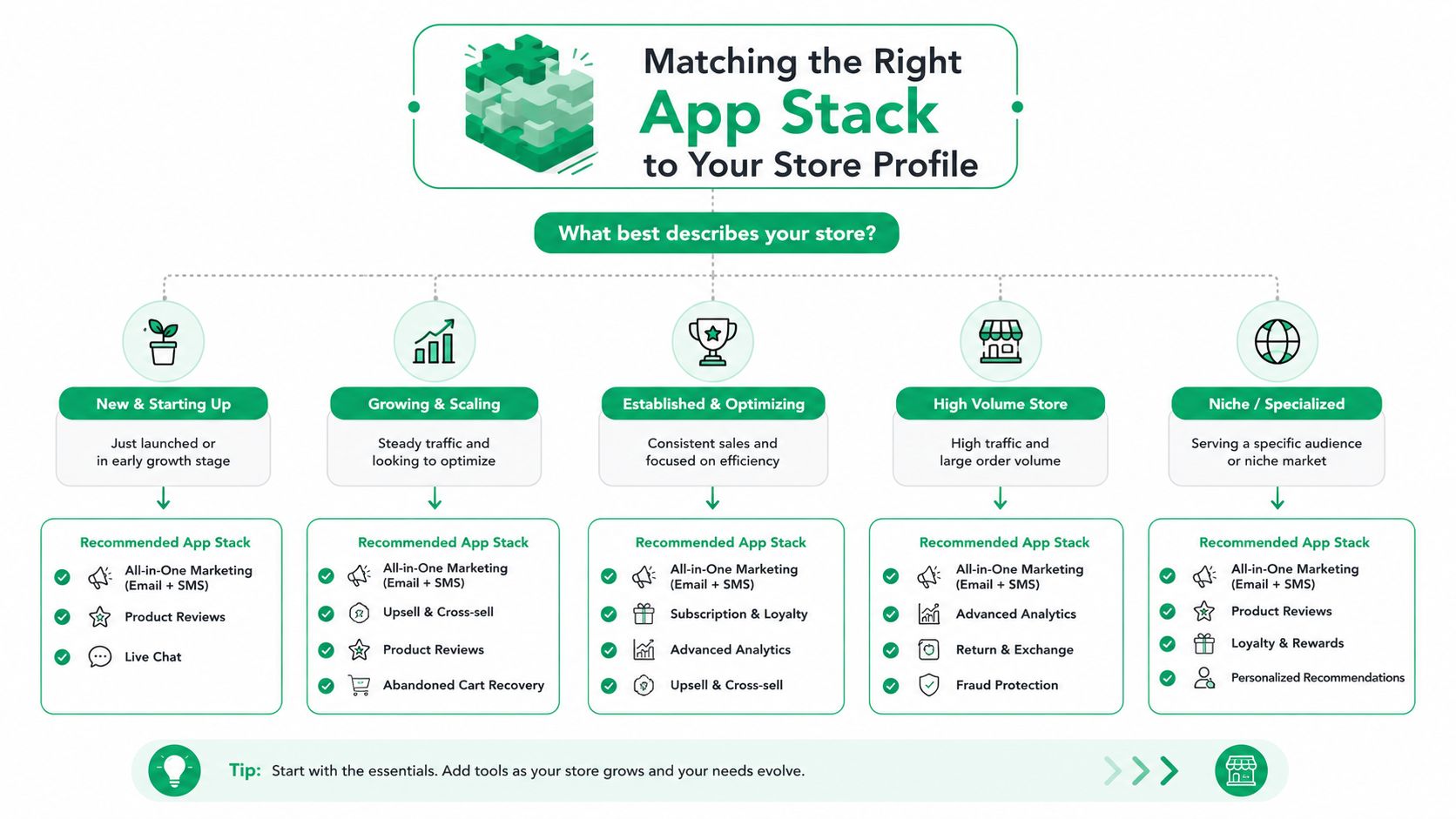
The scaling DTC apparel brand
This merchant sees one-off requests for size swaps, address corrections, duplicate-item removal, and cancellations. The essential layer is controlled post-purchase editing, with product restrictions, time windows, and clear handling for orders already entering fulfillment.
Checkout extensions and merchandising tools are situational. Add them when the brand has a clear offer strategy, such as complementary accessories or bundle upgrades. Analytics should connect offer performance with support workload, refund behavior, and fulfillment exceptions, rather than reporting revenue in isolation.
SelfServe fits this profile as a post-purchase option because it provides customer self-service for permitted changes, including shipping and contact details, and supports merchant-defined rules. Its address validation and order-tagging capabilities are relevant when the brand needs to reduce preventable errors while keeping approval control.
The multi-brand portfolio operator
This operator needs consistency across brands, regions, and fulfillment arrangements. Native ERP, OMS, WMS, and 3PL integrations are essential, as are audit trails that let a central operations team understand which brand or workflow changed an order.
Multilingual customer experiences and market-aware currency handling become important when brands sell internationally. A shared analytics layer can wait if each brand still has unresolved order-state inconsistencies. Standardize governance first, then optimize cross-sell performance.
The wholesale-leaning hybrid
This merchant has consumer storefronts alongside B2B portals or account-specific ordering. ERP hand-off, permissions, approval queues, and contractual support matter more than decorative checkout widgets. The app must distinguish what a consumer can change from what requires an account manager or internal approval.
Treat upsells as situational until the core order lifecycle is reliable. A bundle that creates inventory or pricing conflicts will cost more than it earns. Post-purchase self-service remains relevant, but the workflow should respect customer type, payment terms, fulfillment status, and commercial rules.
The Shopify App Store is crowded, with a 2026 estimate of more than 17,600 apps documented in Shopify App Store statistics from Craftberry. That makes stack discipline essential. Identify your archetype, remove tools that duplicate or complicate the workflow, and let the edit-or-cancel problem guide the next purchase.
Visit SelfServe to evaluate a controlled post-purchase workflow for customer edits, cancellations, address validation, order tagging, and relevant upsells. Start with the order changes creating the most support and fulfillment friction, then confirm the app's rules, integrations, and support tier against your Plus operating model.